

Why it matters
TikTok Search Ads reach users with strong intent — people actively searching for products, services or brands. Performance depends on selecting the right keywords, but today’s workflow is largely manual, guess-based and disconnected from brand insight. This integration combines:- LLM-driven brand and category themes from multi-channel perception data,
- TikTok’s Keyword Recommendation API with search volume and relevance,
- a new theme-based ranking engine inside Share Of Model that surfaces the most strategic terms.
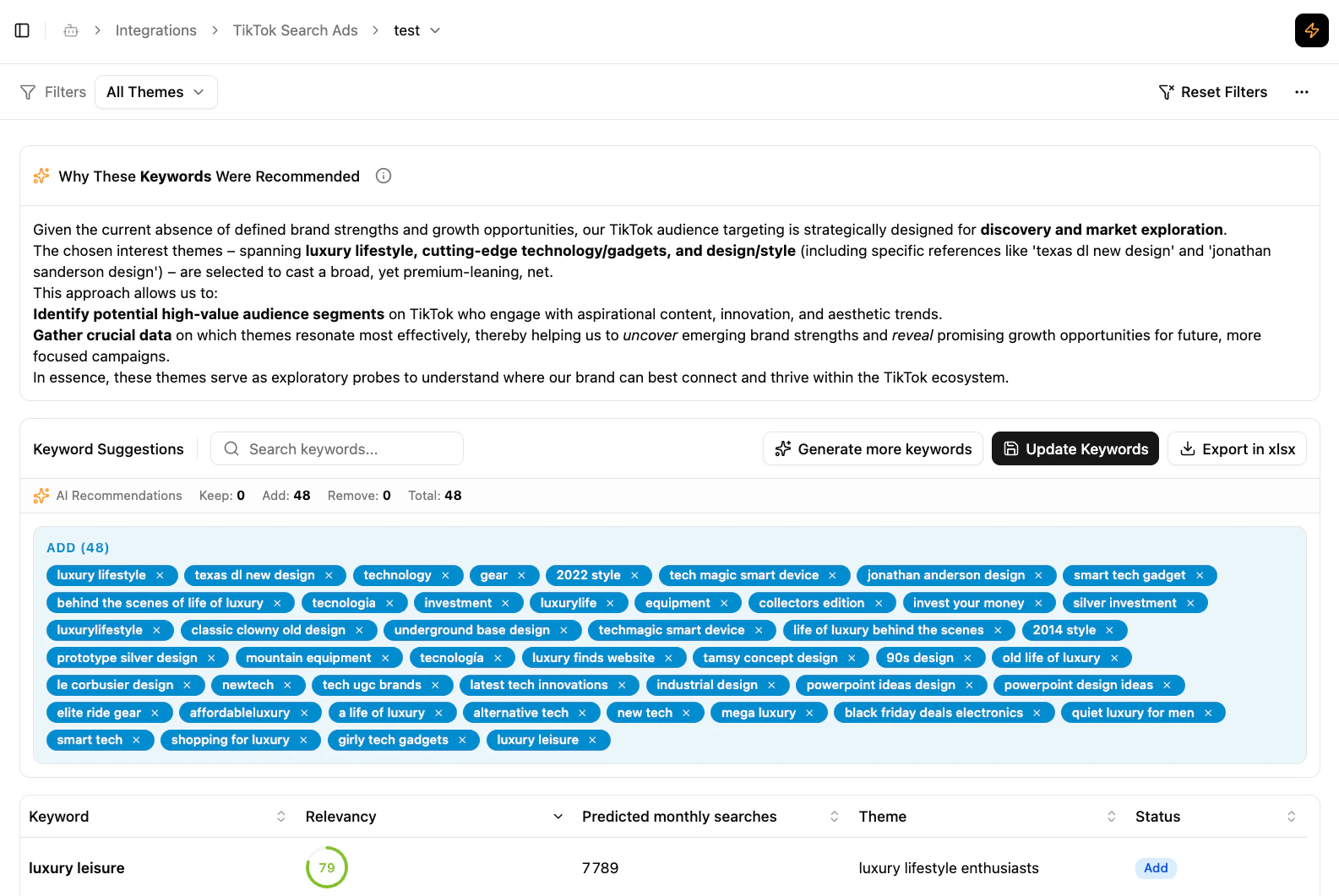
TikTok Search Ads integration
What the integration delivers
Smart keyword recommendations
Brand or category insight (English only) is converted into themes and matched with TikTok recommended keywords, ranked by thematic relevance, search volume and user-intent signals.
Theme-driven keyword groups
Keywords are organised under themes so the strategic connections behind each recommendation are explicit.
Export to TikTok Ads Manager
Select the keywords you want and export an
.xlsx formatted for TikTok Ad Groups, ready to upload into your Search campaign setup.In-platform integration
Available in Activation → TikTok within Share Of Model.
What the integration does
- Works across all TikTok Search campaign types
- Generates 100 keywords by default, organised by theme
- Each keyword includes a relevancy score so you can evaluate fit at a glance — including the initial set
- Generate More lets you dial up additional keywords, with theme selection to focus on the areas most relevant to your strategy
- The algorithm is conservative by design: it only flags keywords for removal when they present a brand safety risk (e.g. harmful, discriminatory, or sensitive content) — preserving your existing keyword strategy wherever possible
How to connect and start an optimization
1
Connect your TikTok Ads Manager
Go to Workspace Settings → Integrations and link the client’s TikTok Ads Manager account via the TikTok Connector.
2
Create a new optimization
Go to Integrations → TikTok Search Ads Keywords and click + New Optimization. The setup is a 3-step flow:
- Destination — Select the TikTok account, the campaign you want to optimize, and the specific ad groups to target. Keywords are applied at the ad group level, so selecting the right ad groups matters.
- Source — Select the Share of Model analysis whose insights will feed the optimization. You can search across all available analyses by brand name or category.
- Summary — Review and confirm before the optimization is created.
Requires Editor or Owner permissions on the workspace.
Managing the TikTok connection
- One connection per workspace — each workspace gets a single TikTok Ads Manager connection, but different workspaces in the same organization can each have their own.
- Required role — to connect TikTok Ads Manager, you need at least Editor role at either the organization or the workspace level.
- Connections are independent — TikTok connections exist independently in the system. Downgrading or removing someone’s permissions doesn’t touch the connection.
Data handling and retention
We only read what’s needed to generate keyword recommendations. We never pull your spend, billing, or performance metrics.What we collect
When you connect TikTok Ads Manager, we read the following through the TikTok Business API:- Advertiser accounts and campaigns — account and Search campaign names and IDs.
- Ad groups and their existing keywords — so recommendations account for the keywords already in place.
- Recommended keywords and search volume — candidate keywords and their monthly search volume from TikTok’s Keyword Recommendation API.
- Brand-safety settings — your account’s content exclusions and vertical sensitivity, so recommendations respect them.
What we store
- Connection credentials — the OAuth authorization that lets Share Of Model access TikTok Ads Manager on your behalf. Credentials are encrypted at rest and are never displayed in the interface.
- Optimization results — the keyword recommendations generated for your campaigns, together with their relevancy scores and rationale.
What we process
Collected data is used to generate recommendations: AI models produce candidate themes, which are ranked using embeddings-based relevance, thematic diversity, and search volume, and screened for brand safety. For details on how data is handled with model providers, see Data collection and compliance.Retention
TikTok connection and optimization data follows the data retention policy of the workspace or organization it belongs to. When a workspace or organization is deleted, its connections, stored credentials, and optimization data are removed along with it. Disconnecting an account at any time removes its connection and credentials.Who it’s for
- Performance marketers
- Growth managers
- Paid media strategists running TikTok Search Ads
- Anyone looking to improve keyword targeting with a data-driven, insight-backed workflow
Benefits
- Higher performance — keywords with real brand resonance and proven search intent.
- More strategic targeting — contextual themes, not just raw keyword lists.
- Faster, more efficient workflows — automate thematic discovery instead of doing manual research.
- A clear bridge between insight and activation — turn Share Of Model perception insights into TikTok campaign improvements.
What’s next
Google Ads PMax
Activate Share Of Model inside Google Ads.
Smart Audience
LLM-powered audience segments for paid campaigns.