> ## Documentation Index
> Fetch the complete documentation index at: https://docs.shareofmodel.ai/llms.txt
> Use this file to discover all available pages before exploring further.
# Ranked URLs
> See which of your pages appear as links in LLM answers and how they perform against competing URLs.
In generative search, visibility is ultimately **URL-driven**. While domains and brands give a high-level signal, LLMs surface specific pages as links. Some URLs become recurring entry points; others appear only on a narrow set of queries.
The **Ranked URLs** view focuses on URLs shown as **links** in LLM answers — not internal sources used by the model. It helps you:
* identify which pages carry the most visibility across prompts and engines,
* understand how visibility is distributed across a site,
* compare individual URLs against competing pages.
## What this view helps you analyse
The view tells you which of your pages are visible in generative answers, how consistently they appear, and how they perform relative to competitors.
### Main table: your URLs at a glance
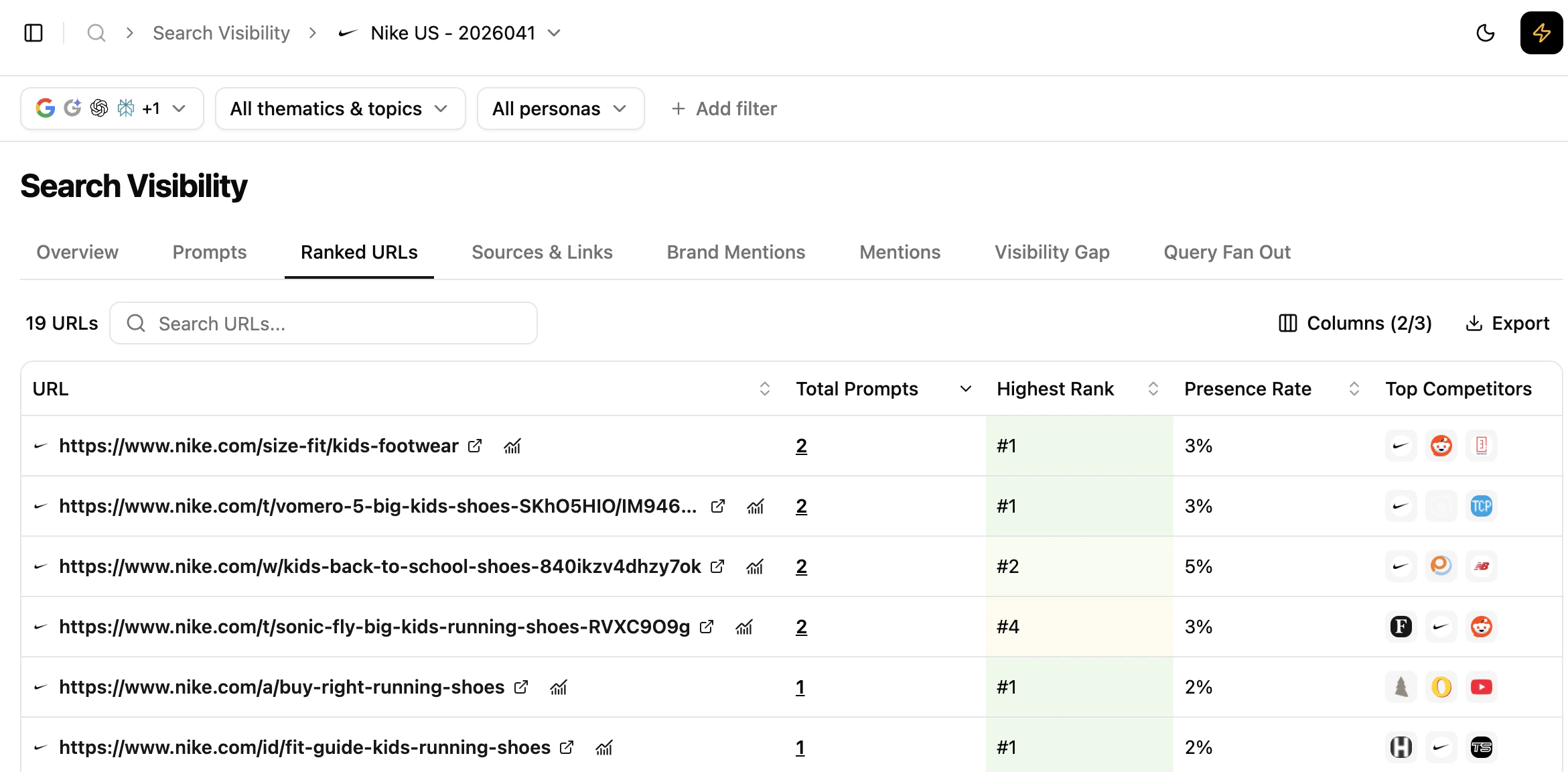 For every URL appearing as a link in LLM answers over the selected period, you see:
* **Total prompts** — how many prompts the URL appears on
* **Highest position** — best rank reached across all prompts and engines
* **Presence Rate** — how consistently the URL appears across results
* **Top competitors** — URLs that most frequently compete on the same prompts
This lets you distinguish:
* URLs that appear often vs. occasionally
* URLs that position highly vs. those that appear lower
* URLs that face consistent competition vs. fragmented competition
Click a URL directly to access and review its content.
### Results details: linking URLs, prompts and engines
For every URL appearing as a link in LLM answers over the selected period, you see:
* **Total prompts** — how many prompts the URL appears on
* **Highest position** — best rank reached across all prompts and engines
* **Presence Rate** — how consistently the URL appears across results
* **Top competitors** — URLs that most frequently compete on the same prompts
This lets you distinguish:
* URLs that appear often vs. occasionally
* URLs that position highly vs. those that appear lower
* URLs that face consistent competition vs. fragmented competition
Click a URL directly to access and review its content.
### Results details: linking URLs, prompts and engines
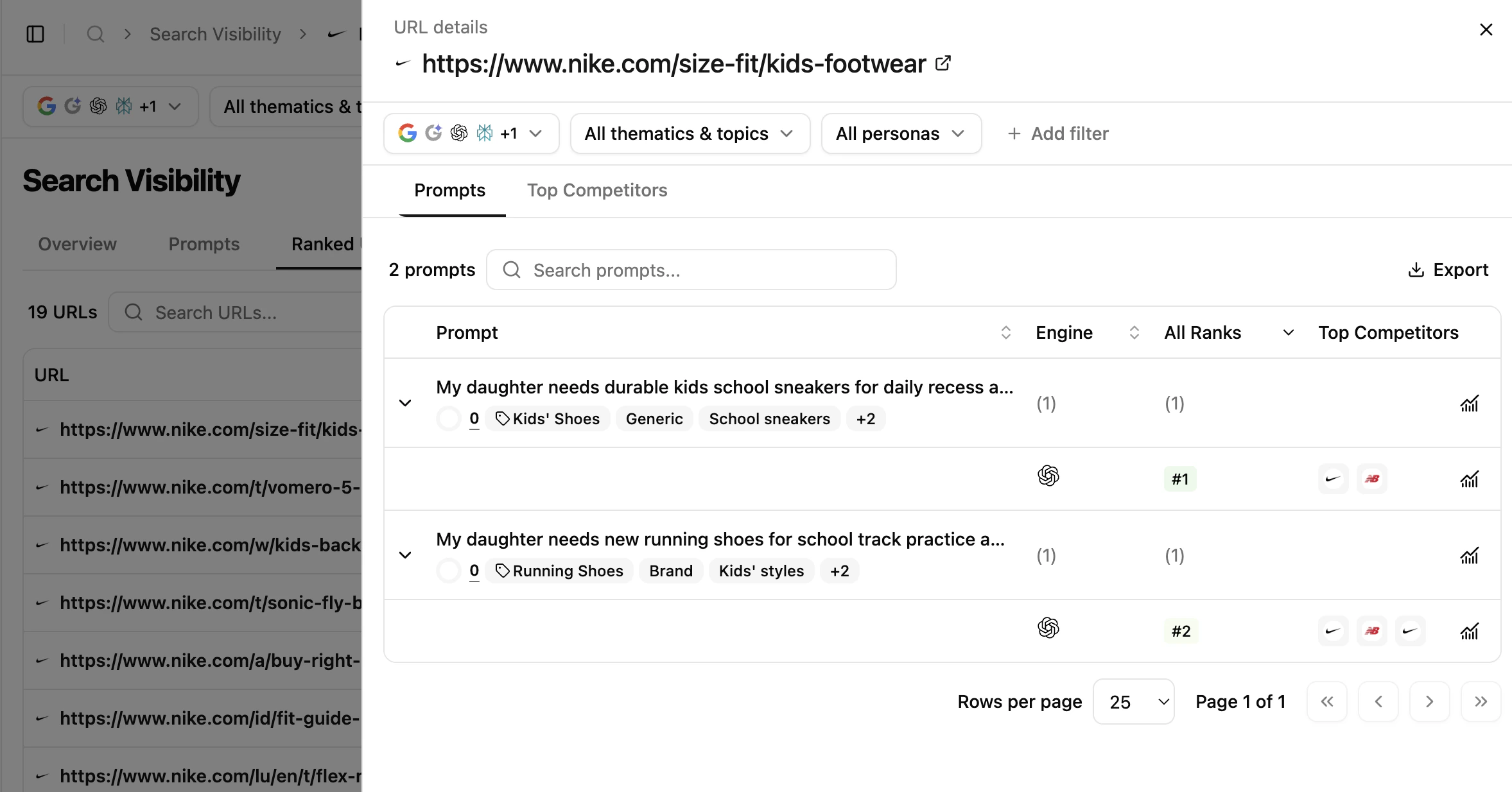 Clicking the **Total prompts** count for a URL opens a side panel showing:
* the prompts on which the URL appears,
* the engines where it is visible,
* the positions per prompt and engine,
* the top 3 competitor URLs in this scope.
You may notice that the same URL ranks differently depending on the engine, that some prompts contribute more visibility than others, and that visibility can be concentrated on a small number of queries.
### Competitive context: URL-level competition
Clicking the **Total prompts** count for a URL opens a side panel showing:
* the prompts on which the URL appears,
* the engines where it is visible,
* the positions per prompt and engine,
* the top 3 competitor URLs in this scope.
You may notice that the same URL ranks differently depending on the engine, that some prompts contribute more visibility than others, and that visibility can be concentrated on a small number of queries.
### Competitive context: URL-level competition
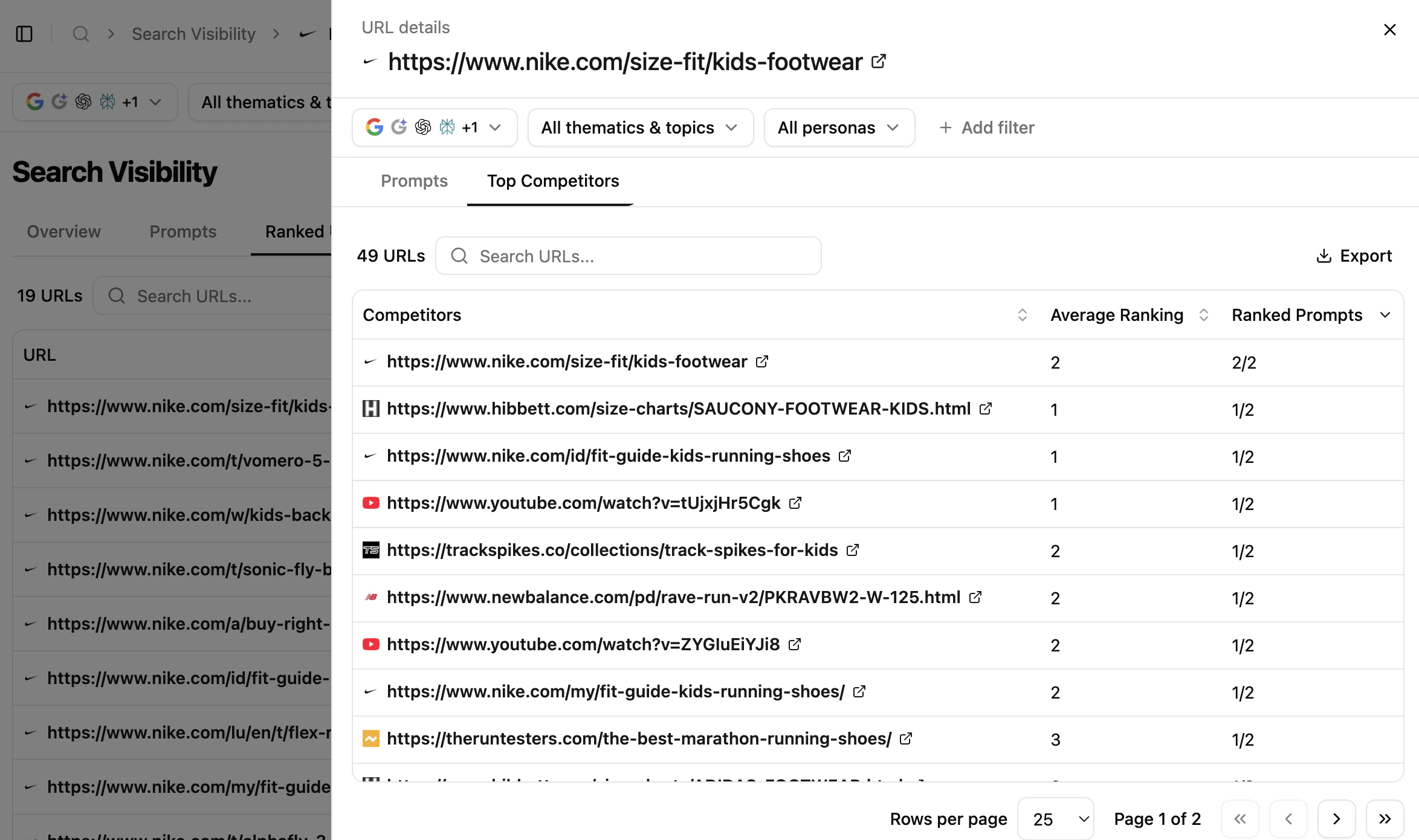 From the same panel, access the **full list of competing URLs** on the prompts your URL ranks on:
* see all competing pages,
* compare average position across prompts,
* identify pages that repeatedly challenge your visibility,
* open competitor pages to inspect their content.
## Reading cues
These are signals to read, not rules.
* **A single URL concentrates most of the visibility** — the model consistently selects one page as the most relevant representation of the topic.
* **Multiple URLs appear on a small number of prompts** — fragmented visibility, no single page dominates.
* **The same competitors appear repeatedly** — stable competitive sets at URL level, rather than broad domain competition.
* **Strong position but low presence rate** — high performance when the URL appears, limited coverage across prompts.
* **High presence rate but lower position** — broad visibility with less prominent positioning.
## How to use this view effectively
Start by identifying URLs that consistently appear as links across multiple prompts and engines. These pages are your **actual entry points** into generative answers.
## What's next
Understand the consistency signal underneath this view.
Compare URLs as sources vs. visible links.
From the same panel, access the **full list of competing URLs** on the prompts your URL ranks on:
* see all competing pages,
* compare average position across prompts,
* identify pages that repeatedly challenge your visibility,
* open competitor pages to inspect their content.
## Reading cues
These are signals to read, not rules.
* **A single URL concentrates most of the visibility** — the model consistently selects one page as the most relevant representation of the topic.
* **Multiple URLs appear on a small number of prompts** — fragmented visibility, no single page dominates.
* **The same competitors appear repeatedly** — stable competitive sets at URL level, rather than broad domain competition.
* **Strong position but low presence rate** — high performance when the URL appears, limited coverage across prompts.
* **High presence rate but lower position** — broad visibility with less prominent positioning.
## How to use this view effectively
Start by identifying URLs that consistently appear as links across multiple prompts and engines. These pages are your **actual entry points** into generative answers.
## What's next
Understand the consistency signal underneath this view.
Compare URLs as sources vs. visible links.