> ## Documentation Index
> Fetch the complete documentation index at: https://docs.shareofmodel.ai/llms.txt
> Use this file to discover all available pages before exploring further.
# Mentions
> Understand how brands and products are mentioned across generative answers.
In generative search, visibility no longer happens only through **websites and domains**.
LLMs increasingly surface **brands and products directly inside generated answers**, sometimes without displaying any website link at all.
Depending on the query, LLMs may mention a brand directly, recommend a specific product instead of the brand, or compare multiple competing entities within the same response.
These mentions shape **brand visibility, consideration, comparison and ultimately user perception** throughout the decision journey.
## What this view helps you analyse
The Brand vs. Product Mentions view helps you analyse:
* how often brands and products are mentioned across LLM answers,
* which products contribute most to brand visibility,
* and how your entities compare against competitors across prompts and engines.
Brand mentions are not collected for traditional Google search engine.
Your own brands and products are highlighted throughout the interface, making it easier to distinguish your visibility from competing entities.
### Main table: analysing brand and product visibility at entity level
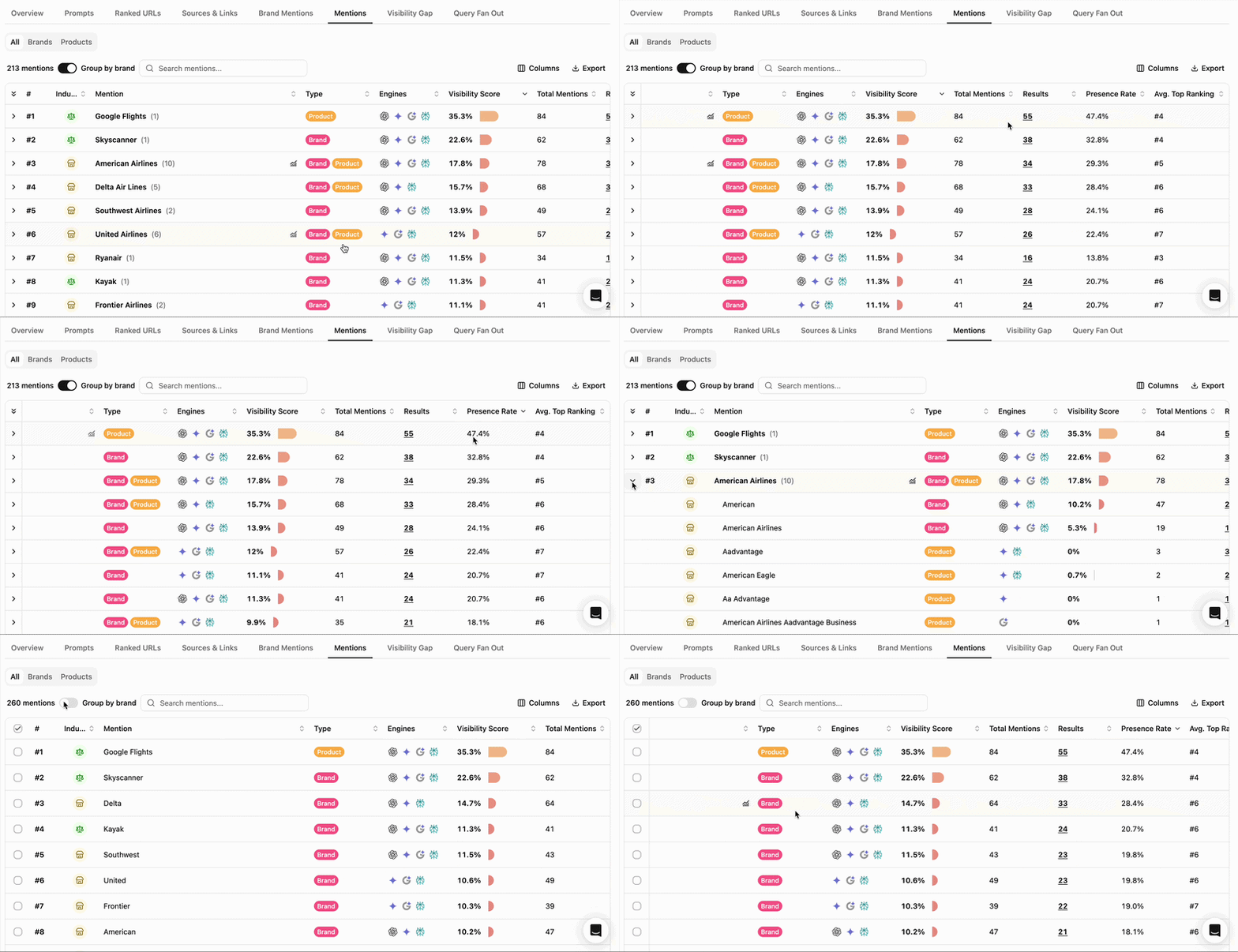
 LLMs do not always represent visibility through brands alone.
Depending on the context, they may:
* mention the company or its acronym directly,
* surface flagship products instead,
* or combine both within the same answer.
The main table helps analyse how visibility is distributed between:
* **brands,**
* **products,**
* and **unified brand + product** entities.
This distinction is especially important because products often dominate visibility on:
* recommendation queries,
* comparison prompts,
* and lower-funnel decision journeys.
**Grouping by brand** makes it possible to understand overall brand visibility while preserving visibility at product level.
You can therefore distinguish:
* brands primarily carried by **direct mentions,**
* **brands strongly reinforced by products,**
* and **products that independently dominate visibility** within a topic.
When **Group by brand** is enabled, unified product mentions contribute to their parent brand visibility while remaining individually identifiable.
Mentions are sorted by **Visibility Score**, helping surface the most visible entities first.
### Results details: linking mentions, prompts and engines
LLMs do not always represent visibility through brands alone.
Depending on the context, they may:
* mention the company or its acronym directly,
* surface flagship products instead,
* or combine both within the same answer.
The main table helps analyse how visibility is distributed between:
* **brands,**
* **products,**
* and **unified brand + product** entities.
This distinction is especially important because products often dominate visibility on:
* recommendation queries,
* comparison prompts,
* and lower-funnel decision journeys.
**Grouping by brand** makes it possible to understand overall brand visibility while preserving visibility at product level.
You can therefore distinguish:
* brands primarily carried by **direct mentions,**
* **brands strongly reinforced by products,**
* and **products that independently dominate visibility** within a topic.
When **Group by brand** is enabled, unified product mentions contribute to their parent brand visibility while remaining individually identifiable.
Mentions are sorted by **Visibility Score**, helping surface the most visible entities first.
### Results details: linking mentions, prompts and engines
 Clicking the Results number opens **the prompts and engines where a brand or product is mentioned**, the total mentions within the result and its top position.
This helps connect entity visibility back to:
* the prompts generating those mentions,
* the engines surfacing them,
* and the contexts in which **brands and products become visible**.
You may notice that:
* a product is consistently mentioned on one engine but not another,
* brands dominate informational prompts while products dominate recommendation-oriented prompts,
* or competing entities appear together repeatedly across the same prompt clusters.
From the side panel, the Details icon provides direct access to the prompt detail and associated snapshot, making it easier to observe how entities are represented within **real generated responses**.
## Reading cues
These are signals to read, not rules.
Often observed on recommendation, comparison or lower-funnel queries where LLMs prioritize **concrete products over corporate entities**.
Indicates that **product-driven mentions** contribute substantially to overall brand presence within generative answers.
Suggests **concentrated product influence**, where a limited subset of products shapes how the brand is represented by LLMs.
Different engines may structure recommendations and entity references differently depending on how they interpret **user intent**.
May reflect **stable competitive clusters** within a category, where LLMs consistently associate the same entities across prompts.
## How to use this view effectively
Start by comparing **direct brand visibility** with **product-driven visibility** across engines and prompts. This helps reveal whether generative visibility is primarily carried by the brand itself or by a smaller set of products shaping how the brand is represented by LLMs.
## Extra features
* **Filters** — refine the data displayed.
* **Add/Hide columns** — adapt the table to your workflow.
* **Export** — extract filtered tables to CSV or Excel.
* **Search** — find a brand or product via the search bar.
* **Sort** — order by any column.
## What's next
Conceptual primer on the two layers.
Drill into URL-level visibility.
Clicking the Results number opens **the prompts and engines where a brand or product is mentioned**, the total mentions within the result and its top position.
This helps connect entity visibility back to:
* the prompts generating those mentions,
* the engines surfacing them,
* and the contexts in which **brands and products become visible**.
You may notice that:
* a product is consistently mentioned on one engine but not another,
* brands dominate informational prompts while products dominate recommendation-oriented prompts,
* or competing entities appear together repeatedly across the same prompt clusters.
From the side panel, the Details icon provides direct access to the prompt detail and associated snapshot, making it easier to observe how entities are represented within **real generated responses**.
## Reading cues
These are signals to read, not rules.
Often observed on recommendation, comparison or lower-funnel queries where LLMs prioritize **concrete products over corporate entities**.
Indicates that **product-driven mentions** contribute substantially to overall brand presence within generative answers.
Suggests **concentrated product influence**, where a limited subset of products shapes how the brand is represented by LLMs.
Different engines may structure recommendations and entity references differently depending on how they interpret **user intent**.
May reflect **stable competitive clusters** within a category, where LLMs consistently associate the same entities across prompts.
## How to use this view effectively
Start by comparing **direct brand visibility** with **product-driven visibility** across engines and prompts. This helps reveal whether generative visibility is primarily carried by the brand itself or by a smaller set of products shaping how the brand is represented by LLMs.
## Extra features
* **Filters** — refine the data displayed.
* **Add/Hide columns** — adapt the table to your workflow.
* **Export** — extract filtered tables to CSV or Excel.
* **Search** — find a brand or product via the search bar.
* **Sort** — order by any column.
## What's next
Conceptual primer on the two layers.
Drill into URL-level visibility.