> ## Documentation Index
> Fetch the complete documentation index at: https://docs.shareofmodel.ai/llms.txt
> Use this file to discover all available pages before exploring further.
# Google Ads PMax Integration (Beta)
> Activate Share Of Model brand-perception insights inside Google Ads Performance Max campaigns.
Share Of Model insights are now linked directly to **Google Ads Performance Max (PMax)** campaigns. Built in collaboration with Google's R\&D teams, this is the *first* opportunity to harness LLM brand-perception data to optimise paid-media performance at scale.
## What is Performance Max?
PMax is Google's most automated, AI-driven campaign type. It reaches audiences across Google's ecosystem — Search, YouTube, Display, Discover, Gmail — from a single campaign. Google's AI handles bidding, targeting and ad creation; advertisers focus on providing high-quality creative assets.
### Core components
* **Asset groups** — the creative foundation: images, headlines, videos, logos. Each group reflects a product, audience, or creative theme.
* **Search themes** — intent-driven signals that help Google match ads to high-intent users. They act as "intent prompts" rather than traditional keywords.
## Prerequisites
* An existing analysis on the Share Of Model platform.
* **Org Owner** or **Org Editor** access on Share Of Model.
* Google Ads accounts with **Standard access** added to your workspace.
* Active PMax campaigns and available asset groups.
## How it works
AI analysis detects brand traits that set you apart from competitors.
Existing PMax campaigns are reviewed for semantic consistency and coverage.
Surface where current messaging misses the mark on key user intents.
Using Keyword Planner and AI filters, the most impactful Search Themes are added directly to your campaigns.
Recommendations follow your account-level brand policy.
## What makes it effective
* **Semantic concepts** — Search Themes reflect live user intent, not generic keywords.
* **AI validation** — embedding-based deduplication and relevance filtering.
* **Strategic value** — every theme is chosen for both demand and performance potential.
## Added value
* **Enhanced signals** — clearer intent alignment and more resonant queries.
* **Creative alignment** — cohesive experience from ad to landing page.
* **Visibility & traffic uplift** — ads speak the language of your customers, lifting CTR and conversions.
* **Faster optimisation** — better targeting and richer data accelerate the learning curve.
* **Direct push to Google Ads** — apply recommendations or export for later.
 ## Intent-based optimisation — Promotion Type Selector
Three-axis intent control lets you set guardrails at the asset-group level to keep PMax aligned with business goals.
**Focus** — direct sales and high-conversion actions.
**Strategy** — locks the model onto transactional keywords, ensuring budget is spent on users ready to purchase rather than information seekers.
**Focus** — lead generation, consultations, professional guidance.
**Strategy** — prioritises high-touch intent for users seeking expertise and professional solutions.
**Focus** — authority, trust, market awareness.
**Strategy** — captures broad, top-of-funnel keywords to build a pipeline of future customers without forcing a hard sell.
Align bidding with intent — spend aggressively on **Product** for immediate ROI, while using **Brand** to capture high-volume, cost-effective awareness.
## Enhanced control & visibility
### Search Themes pivot tables
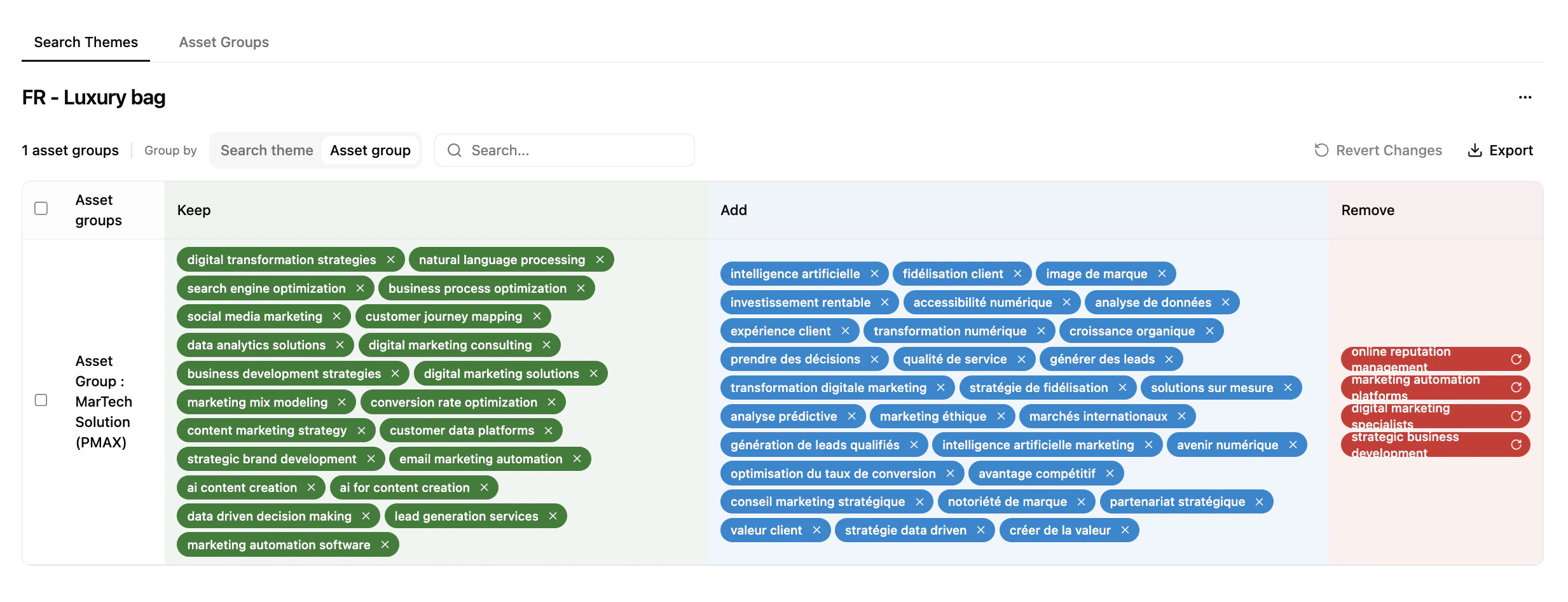
Move beyond siloed management with a holistic view of your keyword strategy.
* **Dual perspective** — toggle between a Search Themes view (which groups a theme impacts) and an Asset Groups view (thematic coverage per group).
* **Smart harmonisation** — instantly spot if the same theme is used across too many groups (avoid internal competition).
* **Bulk management** — keep, add or remove themes across the inventory from one interface.
* **Inventory tracking** — monitor Search Theme volume in real time (e.g. 3/50) to stay within Google's limits.
### Native Google Ads data integration
Assess campaign health without switching platforms.
* **Ad strength visualisation** — Poor / Average / Good scores identify assets that need a refresh.
* **Live status flags** — manage Enabled / Paused statuses and campaign names within the optimisation workflow.
### Relevance scores & predictive metrics
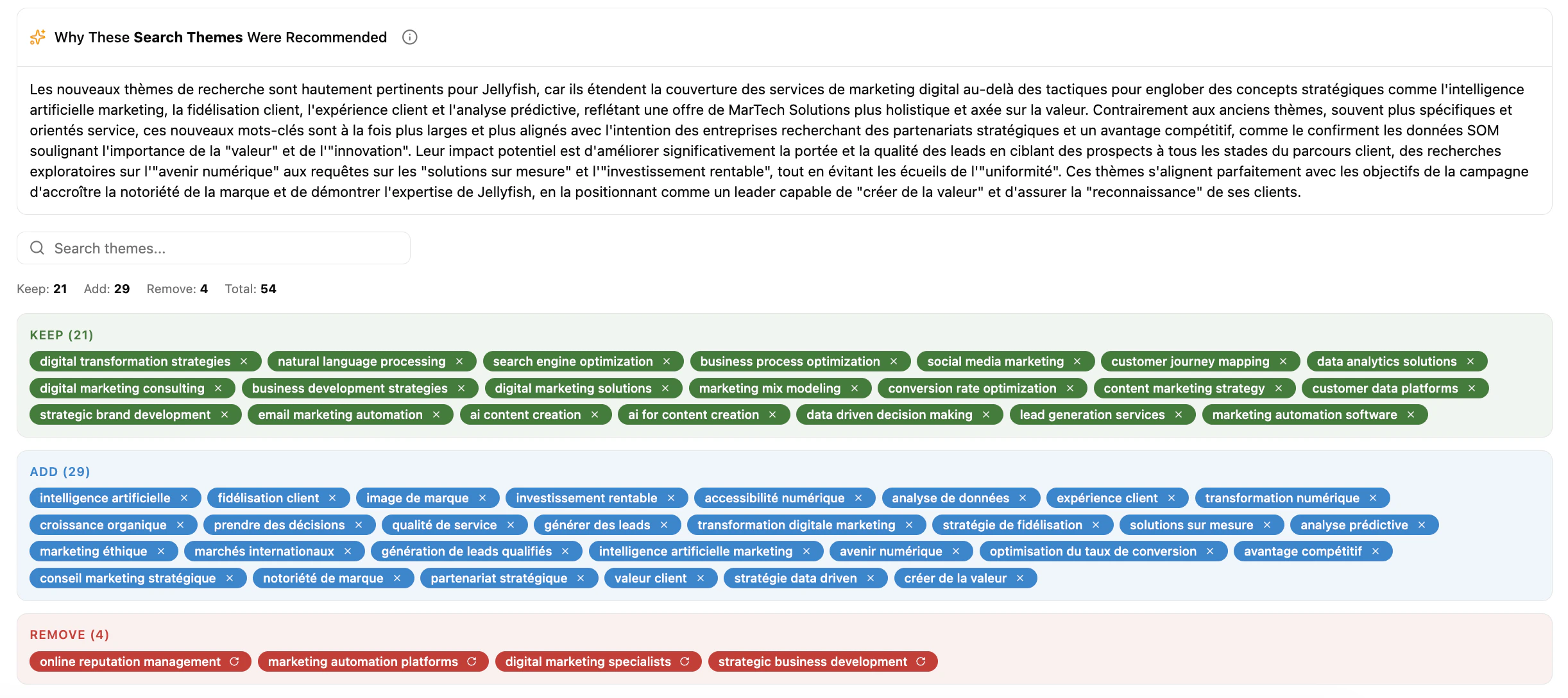
Every Search Theme suggestion includes algorithmic justification.
* **Relevancy score** — Strong / Average / Weak indicator based on historical performance and Asset Group semantics.
* **Logic summaries** — a "Why" block per recommendation, explaining the optimisation logic.
* **Incremental learning** — the system prioritises thematic patterns that historically drive the highest performance for your account.
## What's next
Activate Share Of Model insights on TikTok.
LLM-powered audience segments for paid campaigns.
## Intent-based optimisation — Promotion Type Selector
Three-axis intent control lets you set guardrails at the asset-group level to keep PMax aligned with business goals.
**Focus** — direct sales and high-conversion actions.
**Strategy** — locks the model onto transactional keywords, ensuring budget is spent on users ready to purchase rather than information seekers.
**Focus** — lead generation, consultations, professional guidance.
**Strategy** — prioritises high-touch intent for users seeking expertise and professional solutions.
**Focus** — authority, trust, market awareness.
**Strategy** — captures broad, top-of-funnel keywords to build a pipeline of future customers without forcing a hard sell.
Align bidding with intent — spend aggressively on **Product** for immediate ROI, while using **Brand** to capture high-volume, cost-effective awareness.
## Enhanced control & visibility
### Search Themes pivot tables
Move beyond siloed management with a holistic view of your keyword strategy.
* **Dual perspective** — toggle between a Search Themes view (which groups a theme impacts) and an Asset Groups view (thematic coverage per group).
* **Smart harmonisation** — instantly spot if the same theme is used across too many groups (avoid internal competition).
* **Bulk management** — keep, add or remove themes across the inventory from one interface.
* **Inventory tracking** — monitor Search Theme volume in real time (e.g. 3/50) to stay within Google's limits.
### Native Google Ads data integration
Assess campaign health without switching platforms.
* **Ad strength visualisation** — Poor / Average / Good scores identify assets that need a refresh.
* **Live status flags** — manage Enabled / Paused statuses and campaign names within the optimisation workflow.
### Relevance scores & predictive metrics
Every Search Theme suggestion includes algorithmic justification.
* **Relevancy score** — Strong / Average / Weak indicator based on historical performance and Asset Group semantics.
* **Logic summaries** — a "Why" block per recommendation, explaining the optimisation logic.
* **Incremental learning** — the system prioritises thematic patterns that historically drive the highest performance for your account.
## What's next
Activate Share Of Model insights on TikTok.
LLM-powered audience segments for paid campaigns.