> ## Documentation Index
> Fetch the complete documentation index at: https://docs.shareofmodel.ai/llms.txt
> Use this file to discover all available pages before exploring further.
# Scoring in Pencil Pro
> Evaluate creative assets directly from Pencil Pro using Share Of Model brand-attribute scoring.
Share Of Model Scoring connects the creative library in **Pencil Pro** with the Share Of Model platform. The integration assesses how well each creative reflects your brand's strategic attributes — based on LLM perception — and brings AI-informed feedback into the production process.
## Who it's for
This feature is built for performance marketers, brand managers and creative teams who:
* have both a Share Of Model and a Pencil workspace,
* need to evaluate brand consistency across creatives,
* want structured input to inform revisions,
* prefer to avoid switching platforms for insights.
**What you get**
* On-demand scoring grounded in LLM perception.
* Evaluation of how brand values (Innovation, Trust, etc.) appear in visual or copy elements.
* Score summaries directly inside Pencil.
* Full analyses stored in Share Of Model, with usage debited from the workspace credit quota.
## How it works
When you launch a scoring request from Pencil:
The asset is sent along with the brand name, attributes, category, persona and other key inputs.
A Share Of Model Scoring analysis is initiated inside the corresponding workspace.
A summary score and per-attribute breakdown are returned to Pencil. A link opens the full report inside Share Of Model.
## What it helps you do
* Validate brand alignment before campaign launch.
* Detect missing or overrepresented brand cues.
* Prioritise creative versions for testing.
* Support stakeholder feedback with objective, LLM-based evaluations.
## Requirements
Available only to mutual clients of **Pencil** and **Share Of Model**.
* An active Share Of Model workspace for the Pencil client.
* A Share Of Model API token with **editor permission** at organisation level.
## Step-by-step
Confirm the client has an active Share Of Model workspace, then request the API token from the dedicated Customer Success Manager. If unsure who to contact, post in the `#ask-us` Slack channel.
The token identifies the workspace, tracks analysis usage, and stores the results.
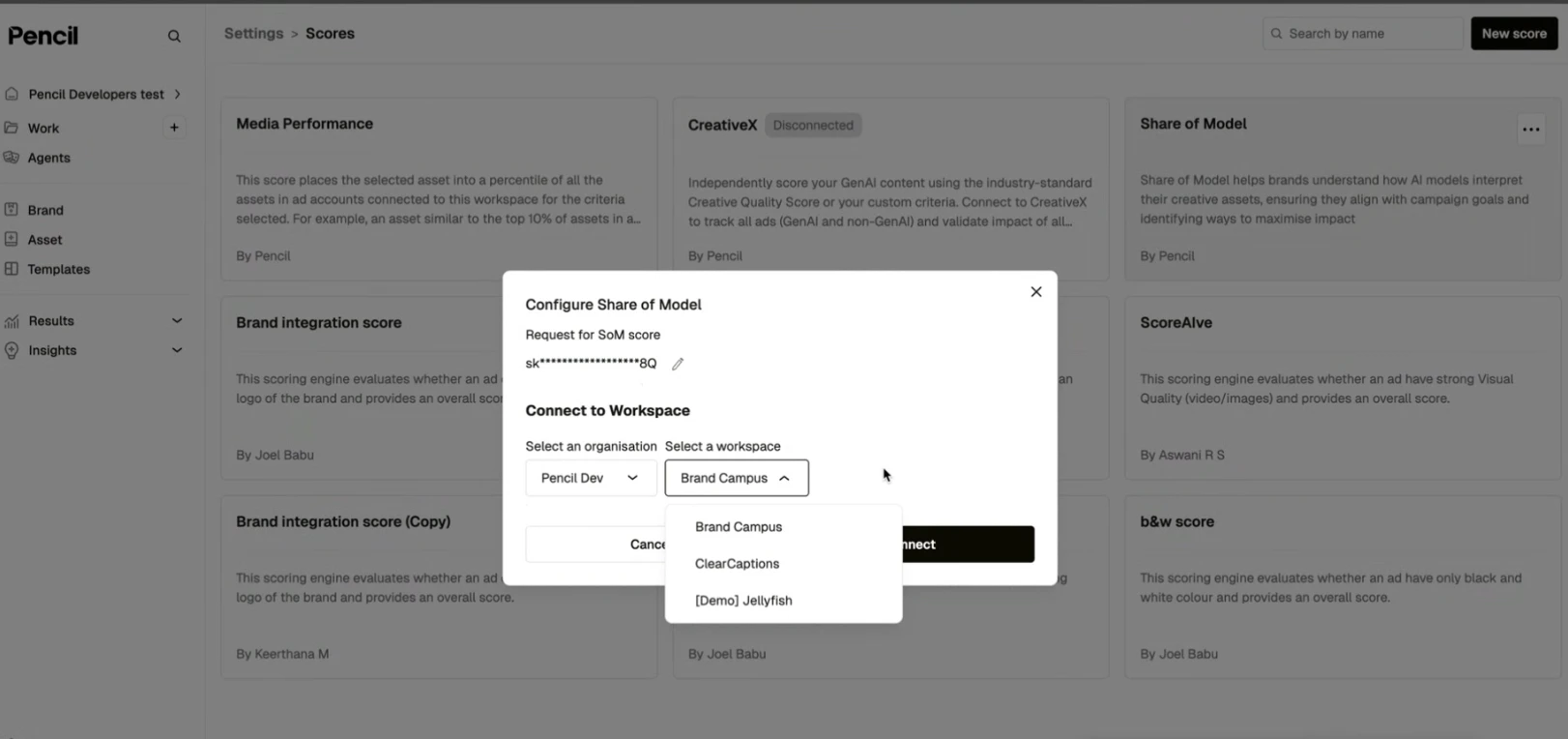
In Pencil, go to **Settings → Scores**. Under **Share Of Model**, click **Connect**, paste the API token, then select the matching organization and workspace and confirm.
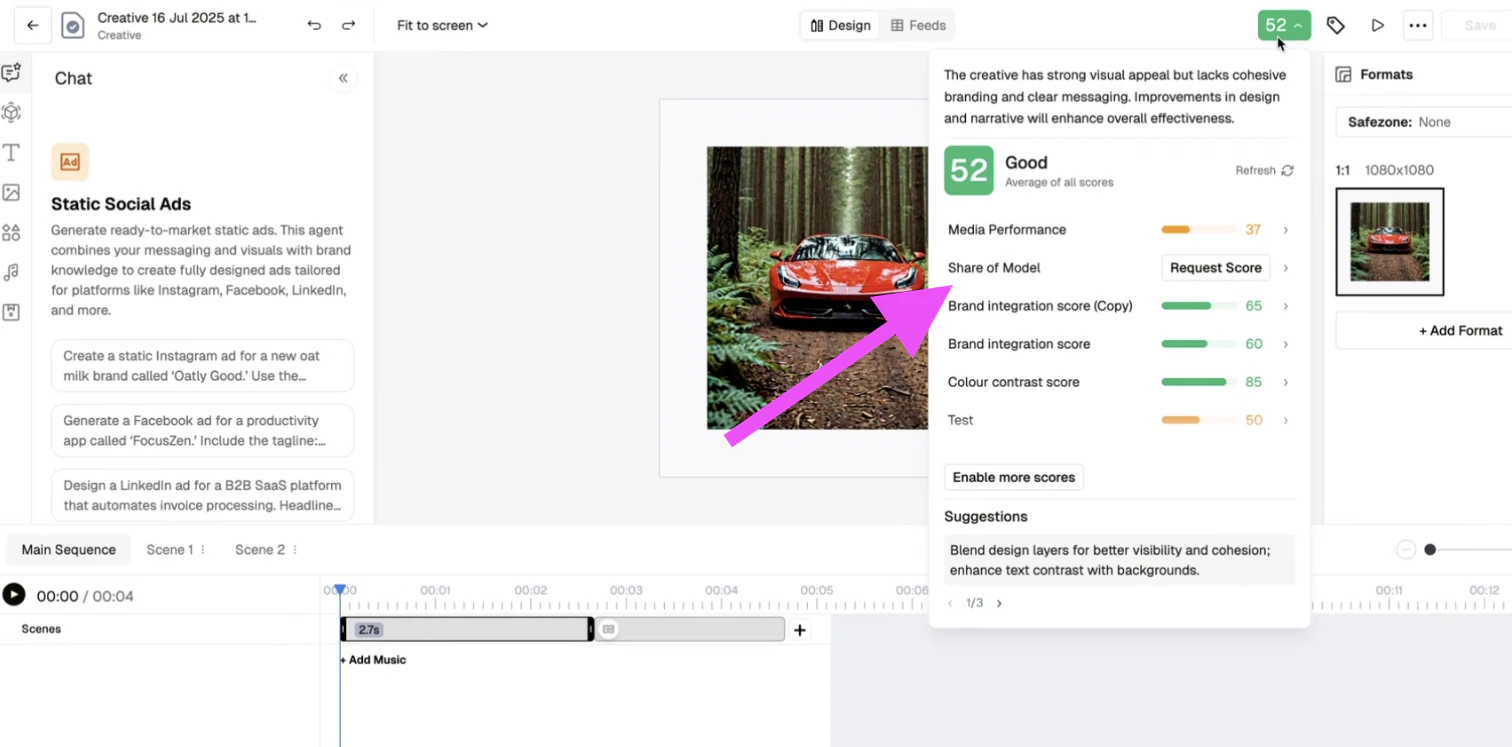
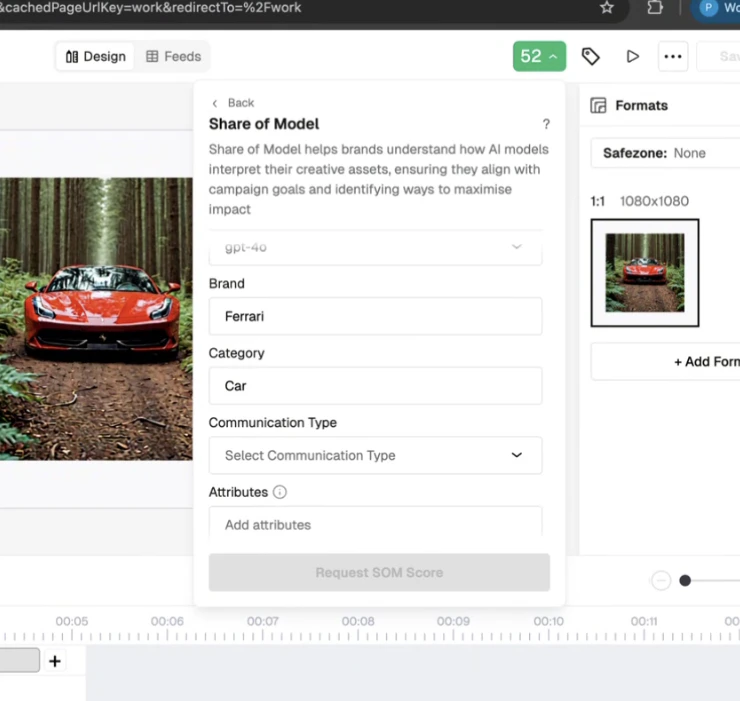
 From the Pencil creative library, select an image, video or text asset and click **Request Share Of Model Score**. Fill in:
* **Brand name**
* **Category** (e.g. *Luxury skincare*)
* **Attributes** — select 3 to 6 (e.g. *Trust*, *Expertise*, *Innovation*)
* **Persona** *(optional)* — e.g. *Eco-conscious 40-year-old female*
From the Pencil creative library, select an image, video or text asset and click **Request Share Of Model Score**. Fill in:
* **Brand name**
* **Category** (e.g. *Luxury skincare*)
* **Attributes** — select 3 to 6 (e.g. *Trust*, *Expertise*, *Innovation*)
* **Persona** *(optional)* — e.g. *Eco-conscious 40-year-old female*
 Once processed, a summary score appears in Pencil with breakdowns on attribute alignment, visual and textual representation, and suggestions for improvement.
A full analysis entry is created in the connected workspace. Open it in Share Of Model for full dashboards: LLM scoring, visual heatmaps, and perception charts.
Each scoring request deducts 1 analysis credit from the workspace quota. Credit usage is visible in the workspace; request additional credits via your CSM.
## Troubleshooting
Contact your CSM or post in the `#ask-us` Slack channel.
Workspace setup is mandatory before using this feature. Confirm with the CSM. Each scoring request also debits the workspace credit quota.
The Share Of Model token has not been added in Pencil settings. Verify the connection in **Settings → Scores**.
The scoring is still processing in the background. Refresh after 1–2 minutes.
The Share Of Model workspace has no remaining credits. Contact the CSM to top up.
The token may be expired, copied incorrectly, or scoped to the wrong workspace. Generate a new token with help from the CSM.
## What's next
Use the Share Of Model agent inside Pencil for brand insights.
Run evaluations directly in Share Of Model.
Once processed, a summary score appears in Pencil with breakdowns on attribute alignment, visual and textual representation, and suggestions for improvement.
A full analysis entry is created in the connected workspace. Open it in Share Of Model for full dashboards: LLM scoring, visual heatmaps, and perception charts.
Each scoring request deducts 1 analysis credit from the workspace quota. Credit usage is visible in the workspace; request additional credits via your CSM.
## Troubleshooting
Contact your CSM or post in the `#ask-us` Slack channel.
Workspace setup is mandatory before using this feature. Confirm with the CSM. Each scoring request also debits the workspace credit quota.
The Share Of Model token has not been added in Pencil settings. Verify the connection in **Settings → Scores**.
The scoring is still processing in the background. Refresh after 1–2 minutes.
The Share Of Model workspace has no remaining credits. Contact the CSM to top up.
The token may be expired, copied incorrectly, or scoped to the wrong workspace. Generate a new token with help from the CSM.
## What's next
Use the Share Of Model agent inside Pencil for brand insights.
Run evaluations directly in Share Of Model.