> ## Documentation Index
> Fetch the complete documentation index at: https://docs.shareofmodel.ai/llms.txt
> Use this file to discover all available pages before exploring further.

# Asset Evaluation Starter Kit

> Set up and launch your first asset evaluation, then read and compare the results.

The **Asset Evaluation** feature lets you systematically assess creative assets to verify they reflect your brand's key messaging and resonate with your target audience. This guide walks through the full workflow.

## Prerequisites

<Note>
  Evaluations only run on a single asset type at a time. You cannot mix images, text and video in the same evaluation.
</Note>

Supported file formats:

| Asset type | Allowed formats           |
| ---------- | ------------------------- |
| Images     | JPEG, JPG, PNG, GIF, WebP |
| Text       | PDF, DOC, DOCX            |
| Videos     | MP4, AVI, MOV             |

## Set up your evaluation

<Steps>
  <Step title="Open the Asset Evaluation tool">
    From the left-hand menu of the **Share Of Model** UI, click **Asset**, then click **New asset evaluation**.
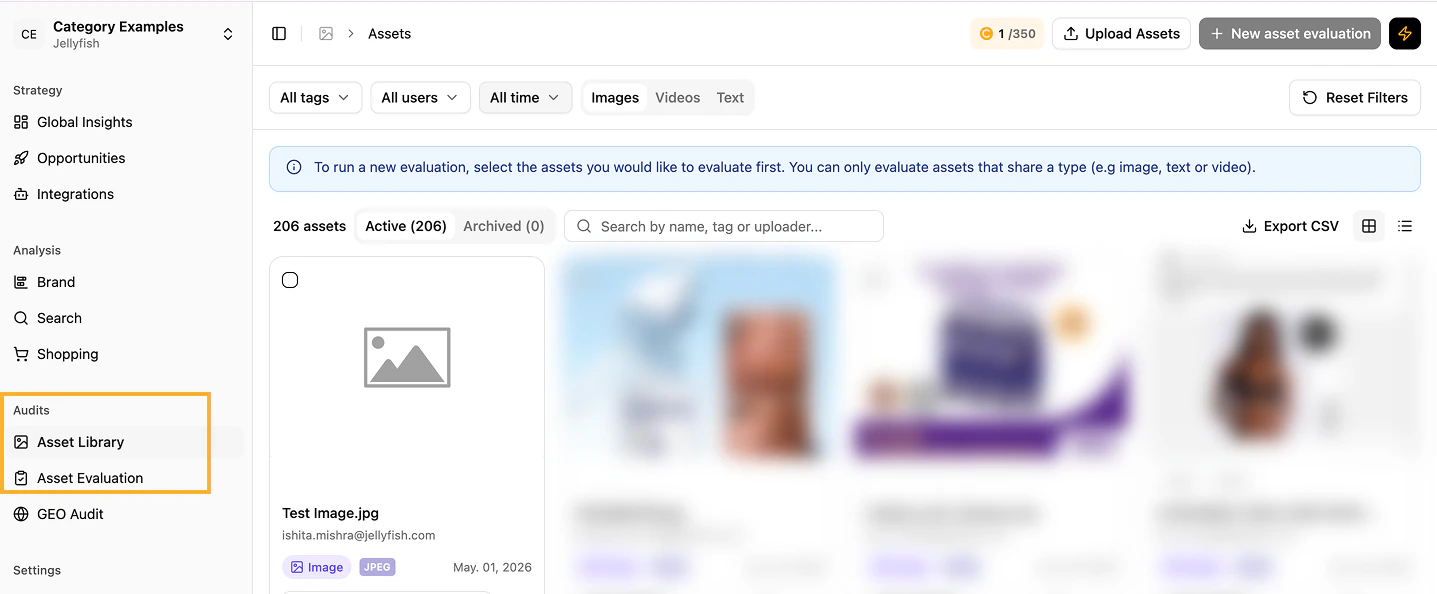
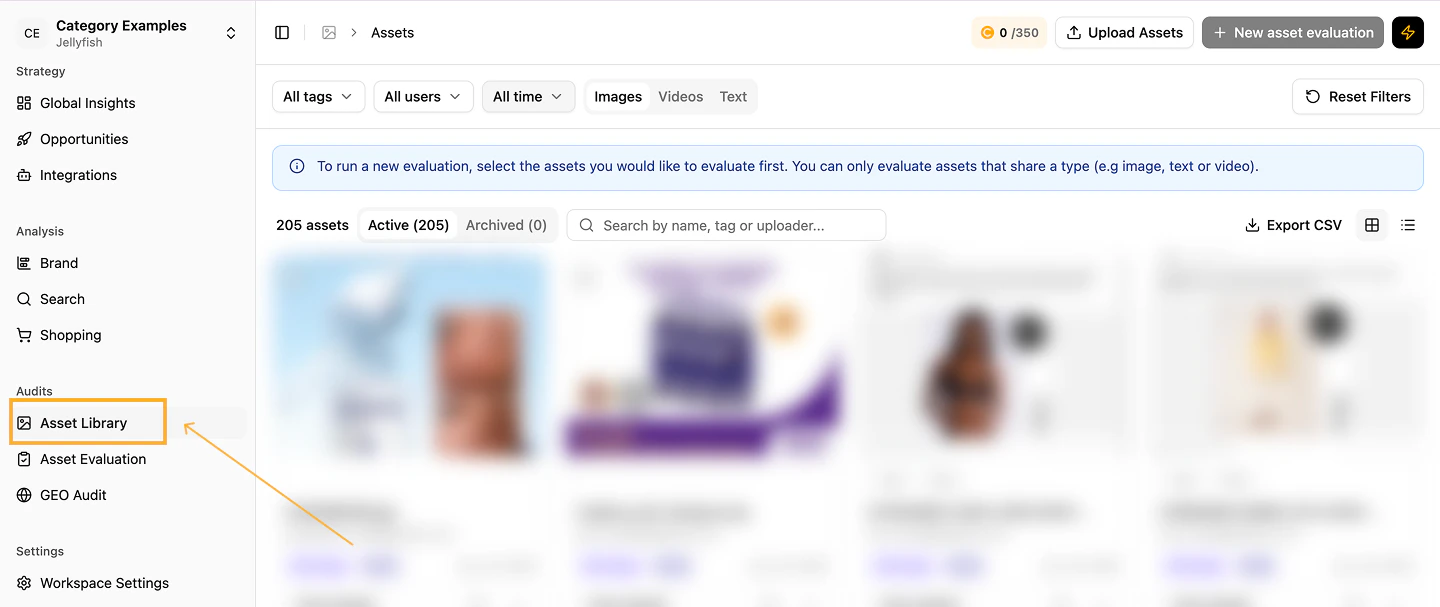
    <Frame caption="Asset Evaluation entry point">
      <img src="https://mintcdn.com/jellyfish/MmUm2_YE5Jn6SqTt/images/platform/evaluations/Asset-Evaluation-1-210071bd.png?fit=max&auto=format&n=MmUm2_YE5Jn6SqTt&q=85&s=d4a8d308fb481ed3c779f449b818e155" alt="Asset Evaluation entry" width="1437" height="594" data-path="images/platform/evaluations/Asset-Evaluation-1-210071bd.png" />
    </Frame>

    <Frame caption="Library">
      <img src="https://mintcdn.com/jellyfish/oiuNBuQ2NqPF1etD/images/platform/evaluations/Library-9706077d.png?fit=max&auto=format&n=oiuNBuQ2NqPF1etD&q=85&s=16fa621972a6d0a3f81e9b51b16b9254" alt="Library" width="1440" height="607" data-path="images/platform/evaluations/Library-9706077d.png" />
    </Frame>
  </Step>

  <Step title="Upload assets to the library">
    Click **Upload assets** to add files to the library.
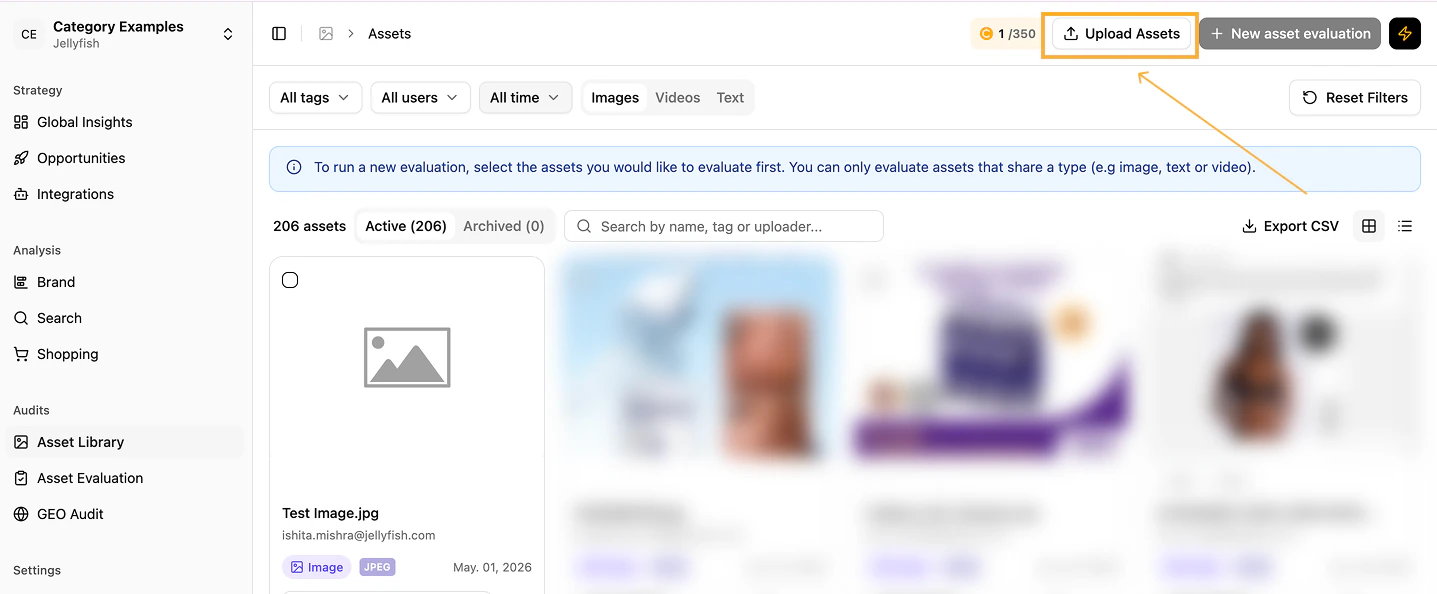
    <Frame caption="Upload assets">
      <img src="https://mintcdn.com/jellyfish/MmUm2_YE5Jn6SqTt/images/platform/evaluations/Asset-Evaluation-3-f957a81a.png?fit=max&auto=format&n=MmUm2_YE5Jn6SqTt&q=85&s=7e8abe38c1e4627b1c32831bdec00d7a" alt="Upload assets" width="1437" height="594" data-path="images/platform/evaluations/Asset-Evaluation-3-f957a81a.png" />
    </Frame>

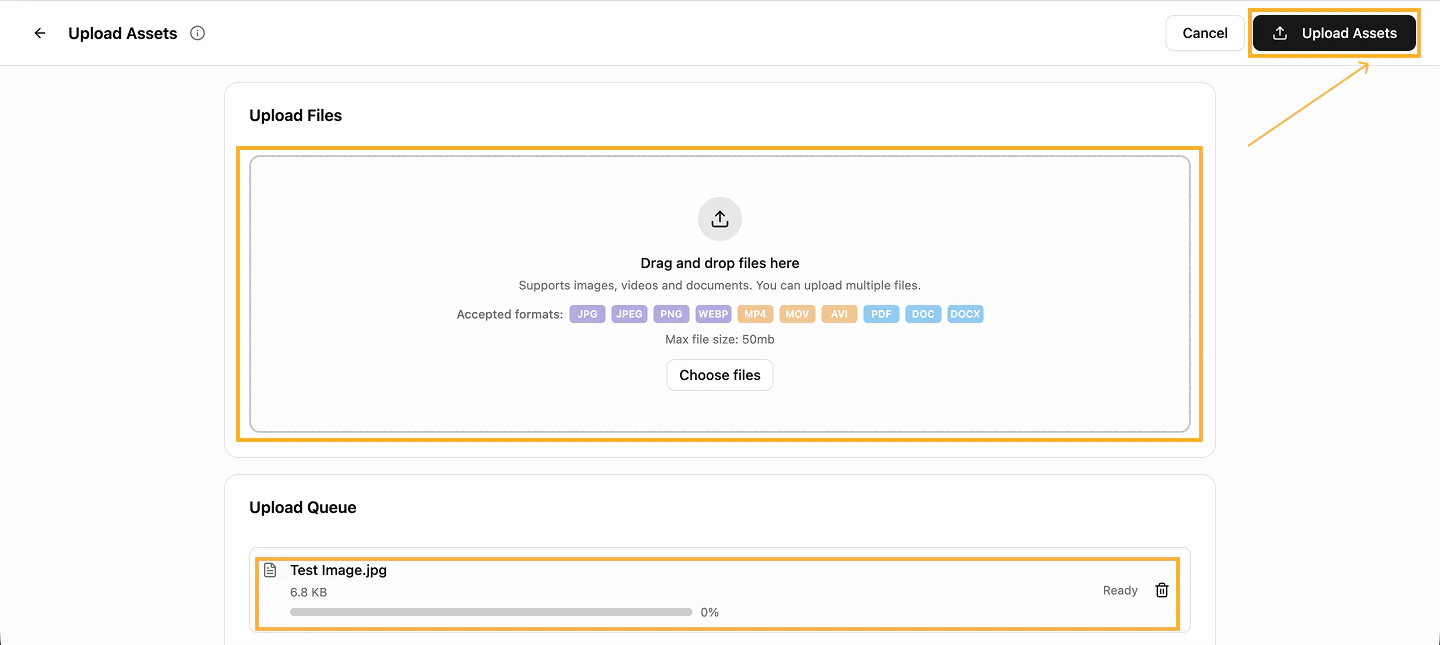
    Confirm the upload to commence processing.

    <Warning>
      Make sure assets respect the size limits indicated on the platform.
    </Warning>

    <Frame caption="Upload confirmation">
      <img src="https://mintcdn.com/jellyfish/MmUm2_YE5Jn6SqTt/images/platform/evaluations/Upload-Assets-f48eb913.png?fit=max&auto=format&n=MmUm2_YE5Jn6SqTt&q=85&s=91f573dbbe579b55f236b1cc39cea3d9" alt="Upload confirmation" width="1440" height="645" data-path="images/platform/evaluations/Upload-Assets-f48eb913.png" />
    </Frame>

    Once uploaded, select the asset(s) for the evaluation and click **New asset evaluation**.
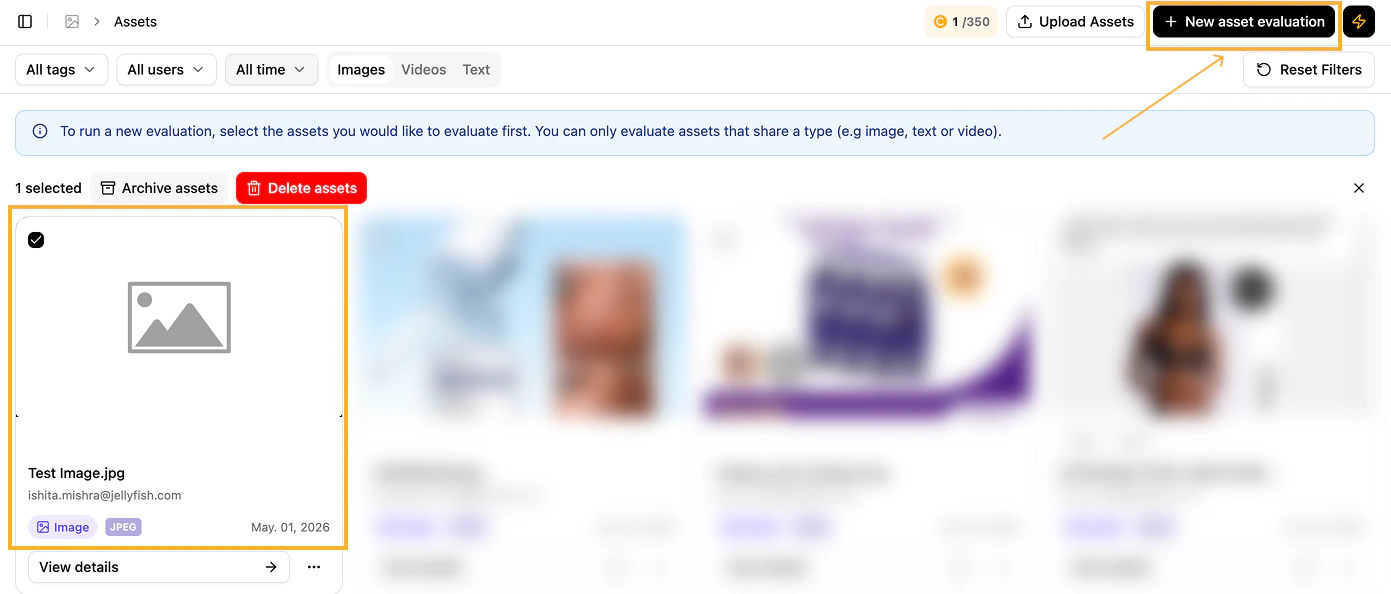
    <Frame caption="Start a new evaluation">
      <img src="https://mintcdn.com/jellyfish/MmUm2_YE5Jn6SqTt/images/platform/evaluations/New-Evaluation-7e3061f5.png?fit=max&auto=format&n=MmUm2_YE5Jn6SqTt&q=85&s=084fc3b2cc95bd54f1bf316384fa83f8" alt="New evaluation" width="1391" height="594" data-path="images/platform/evaluations/New-Evaluation-7e3061f5.png" />
    </Frame>
  </Step>

  <Step title="Review the selected assets">
    Confirm the assets and click **Next**.
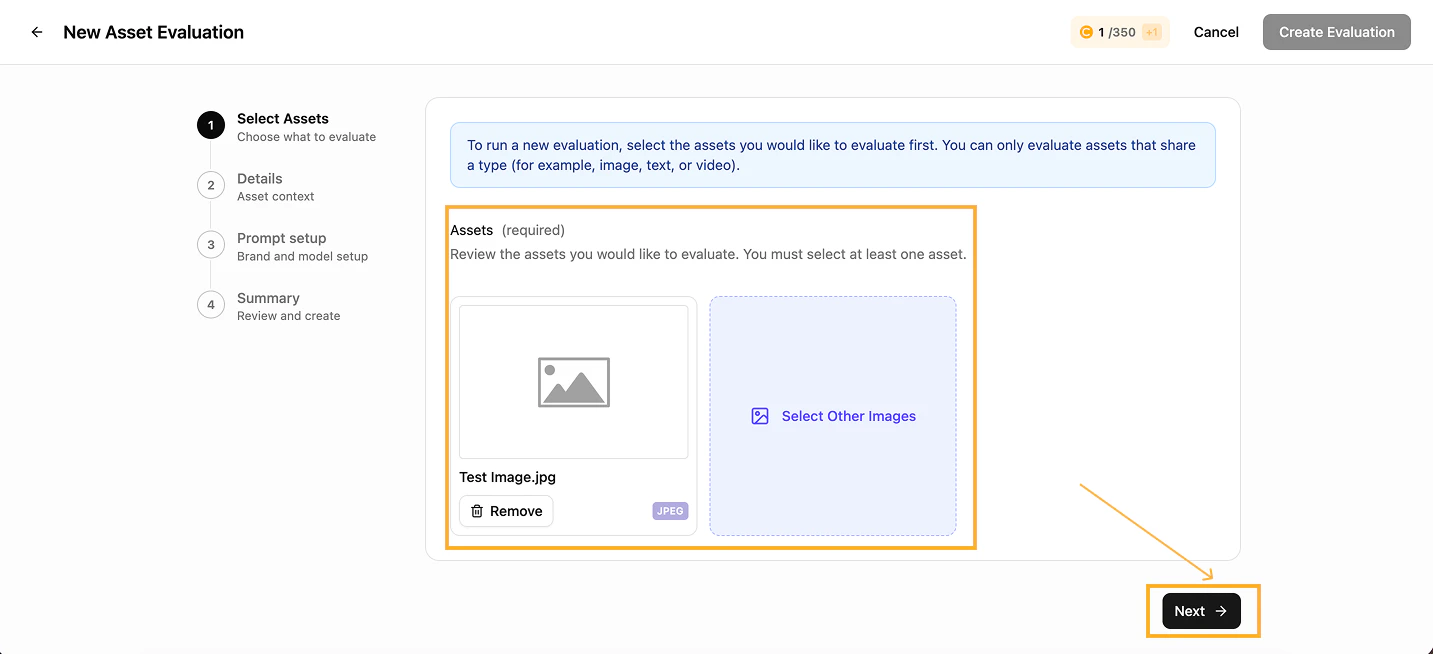
    <Frame caption="Review assets">
      <img src="https://mintcdn.com/jellyfish/MmUm2_YE5Jn6SqTt/images/platform/evaluations/Parameter-new-evaluation-1-2292727f.png?fit=max&auto=format&n=MmUm2_YE5Jn6SqTt&q=85&s=4e73b2f3bbaeff28f9793f5574349c1d" alt="Review assets" width="1433" height="654" data-path="images/platform/evaluations/Parameter-new-evaluation-1-2292727f.png" />
    </Frame>
  </Step>

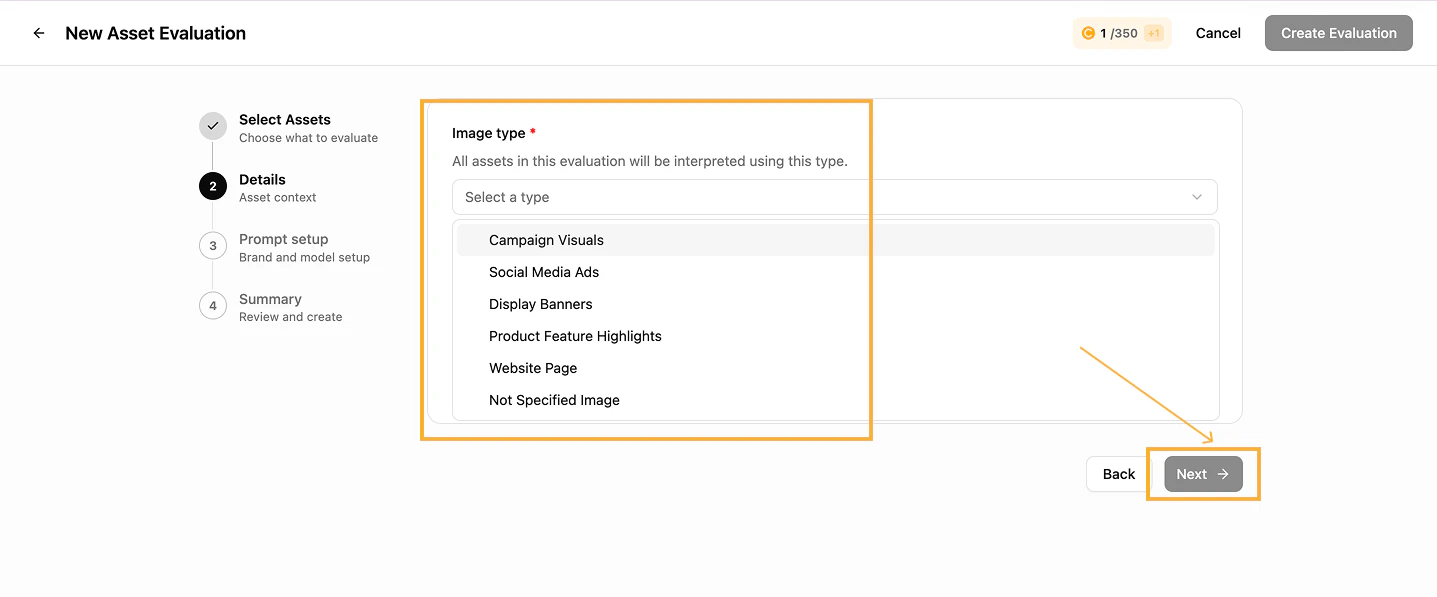
  <Step title="Choose the asset type">
    Pick the asset type (image, text, or video) from the dropdown.
    <Frame caption="Asset type selection">
      <img src="https://mintcdn.com/jellyfish/MmUm2_YE5Jn6SqTt/images/platform/evaluations/Paremeters-new-evaluation-2-87a0bde4.png?fit=max&auto=format&n=MmUm2_YE5Jn6SqTt&q=85&s=062617d854ffbfdc6967217e7ee6615e" alt="Asset type" width="1437" height="597" data-path="images/platform/evaluations/Paremeters-new-evaluation-2-87a0bde4.png" />
    </Frame>
  </Step>

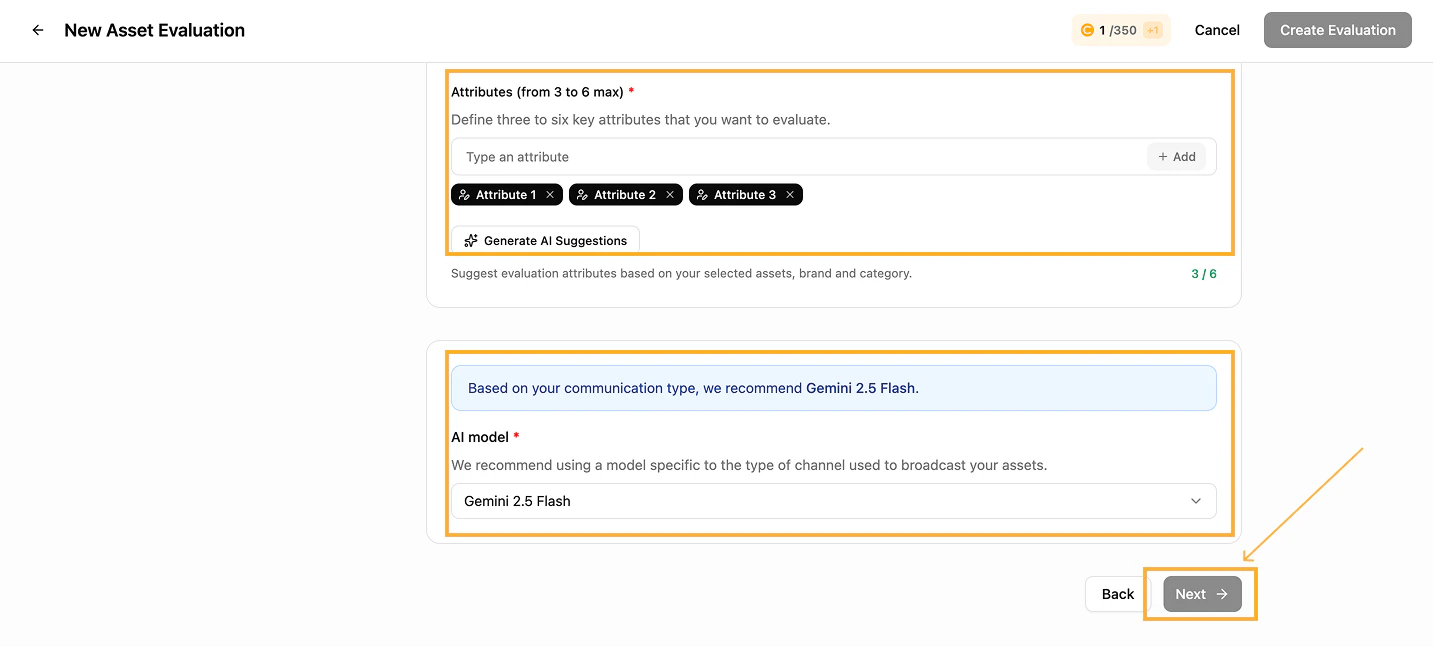
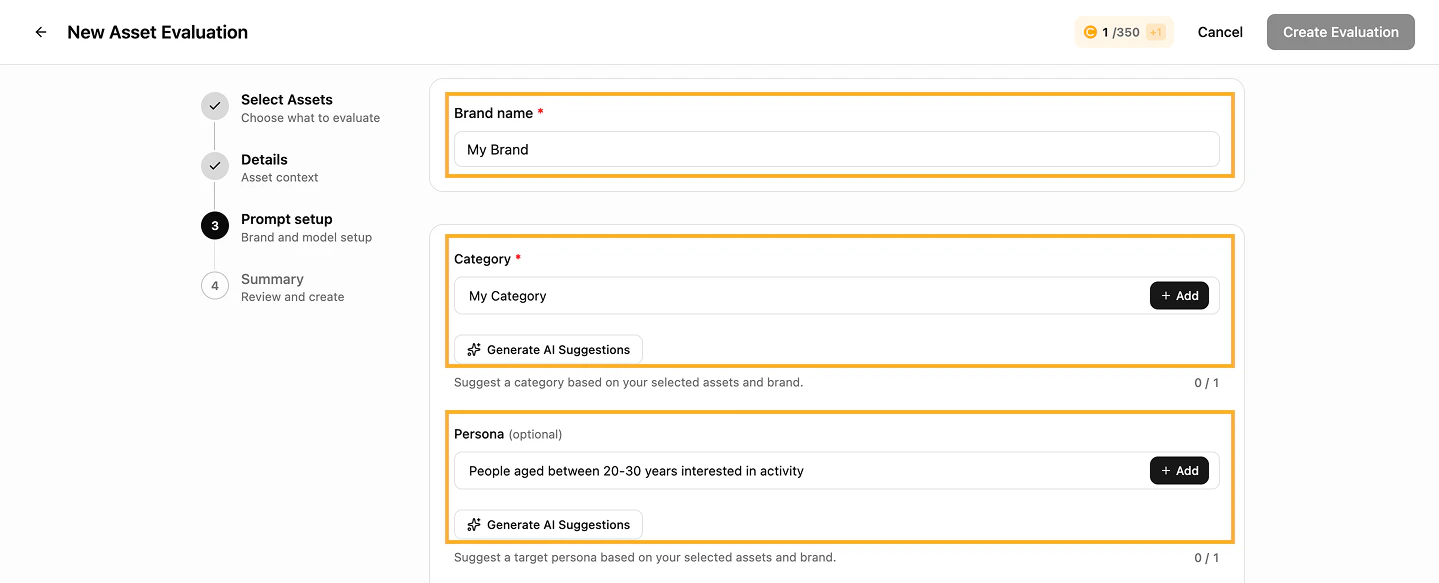
  <Step title="Configure the prompt set-up">
    Fill in every field in the set-up section, then click **Next**.
    <Frame caption="Prompt set-up — part 1">
      <img src="https://mintcdn.com/jellyfish/MmUm2_YE5Jn6SqTt/images/platform/evaluations/Parameters-new-evaluation-3-dd2b571c.png?fit=max&auto=format&n=MmUm2_YE5Jn6SqTt&q=85&s=289e18ff03fa9e00b4f4d8b582440a7a" alt="Prompt set-up 1" width="1439" height="583" data-path="images/platform/evaluations/Parameters-new-evaluation-3-dd2b571c.png" />
    </Frame>

    <Frame caption="Prompt set-up — part 2">
      <img src="https://mintcdn.com/jellyfish/MmUm2_YE5Jn6SqTt/images/platform/evaluations/Parameters-new-evaluation-4-b2d91096.png?fit=max&auto=format&n=MmUm2_YE5Jn6SqTt&q=85&s=2d4ac32c50ef3f700db2e7c86ad2da7e" alt="Prompt set-up 2" width="1433" height="647" data-path="images/platform/evaluations/Parameters-new-evaluation-4-b2d91096.png" />
    </Frame>
  </Step>

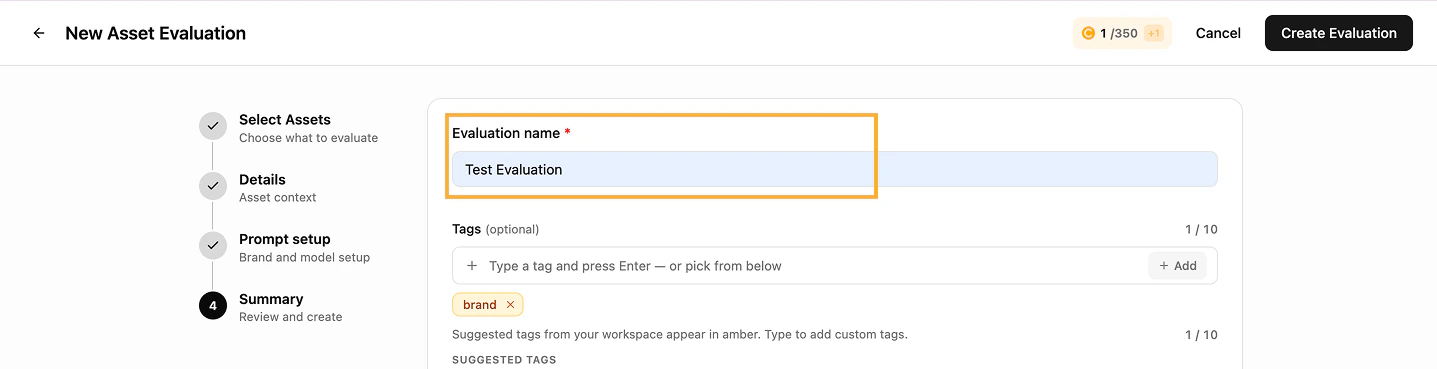
  <Step title="Name and review the evaluation">
    Give the evaluation a meaningful name and review the summary before creating it.
    <Frame caption="Evaluation name and summary">
      <img src="https://mintcdn.com/jellyfish/MmUm2_YE5Jn6SqTt/images/platform/evaluations/Paremeters-new-evaluation-5-0d7e6376.png?fit=max&auto=format&n=MmUm2_YE5Jn6SqTt&q=85&s=06949ee3cd3211379e266e9c6296a1bd" alt="Name and review" width="1437" height="369" data-path="images/platform/evaluations/Paremeters-new-evaluation-5-0d7e6376.png" />
    </Frame>
  </Step>

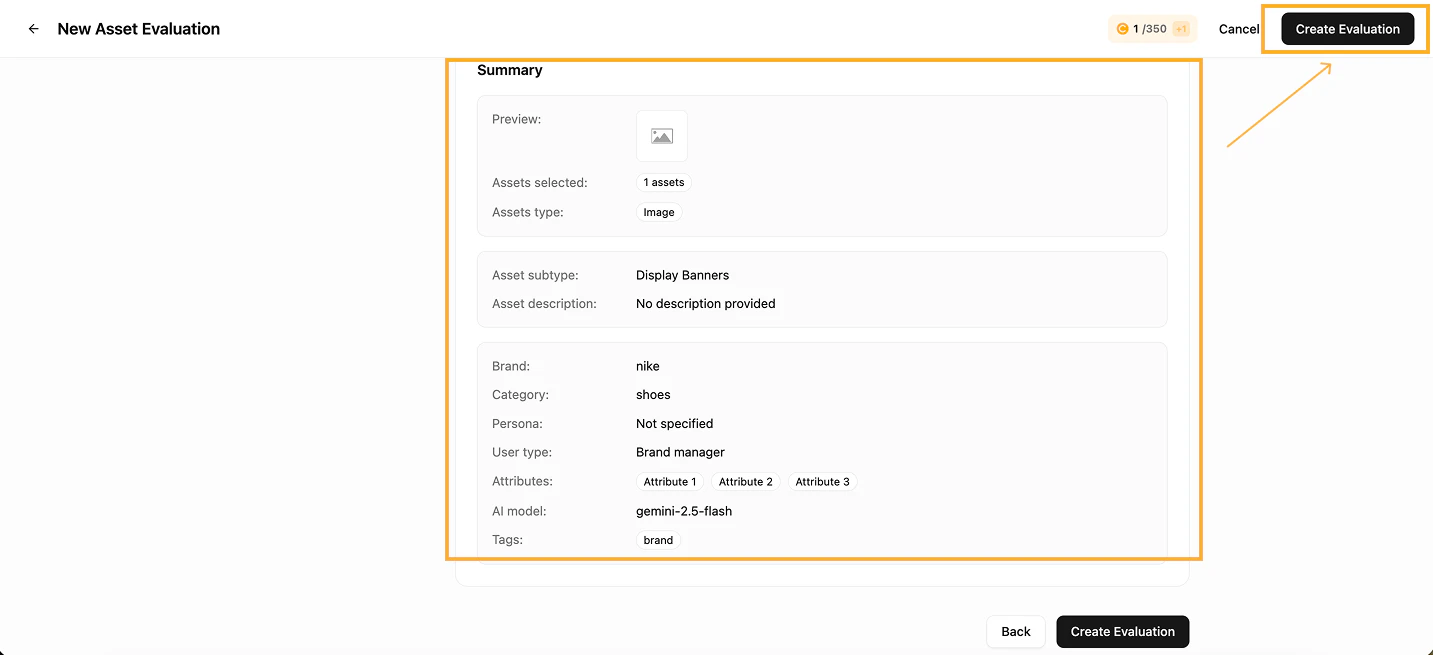
  <Step title="Create the evaluation">
    With every field validated and reviewed, click **Create evaluation** to launch.
    <Frame caption="Launch the evaluation">
      <img src="https://mintcdn.com/jellyfish/MmUm2_YE5Jn6SqTt/images/platform/evaluations/Launch-evaluation-a10f85d6.png?fit=max&auto=format&n=MmUm2_YE5Jn6SqTt&q=85&s=10befabebb4710e3e00f985356a85cc3" alt="Launch" width="1433" height="655" data-path="images/platform/evaluations/Launch-evaluation-a10f85d6.png" />
    </Frame>
  </Step>
</Steps>

<Tip>
  At any stage you can use **Back** to return and amend earlier parameters.
</Tip>

## Read the results

<Steps>
  <Step title="Open the evaluation">
    From the **Evaluation** tab on top of the dashboard, open the completed evaluation.
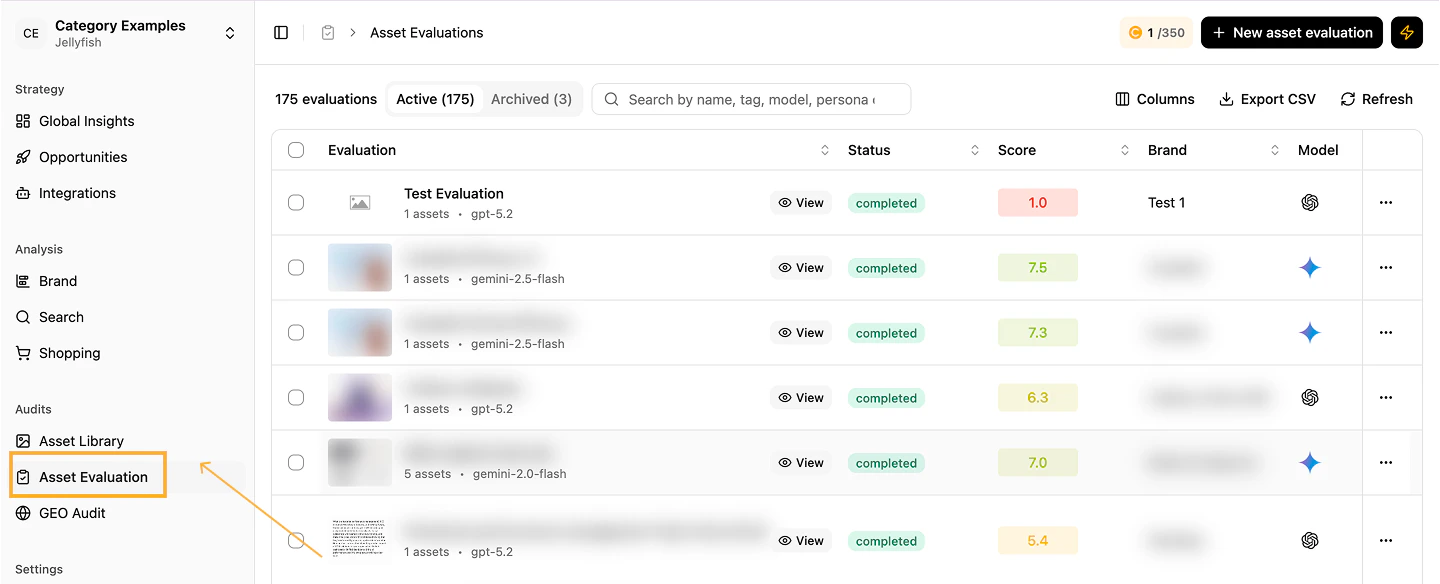
    <Frame caption="Evaluation list">
      <img src="https://mintcdn.com/jellyfish/oiuNBuQ2NqPF1etD/images/platform/evaluations/Evaluation-b79b992f.png?fit=max&auto=format&n=oiuNBuQ2NqPF1etD&q=85&s=7b18a3b99a95b520812bb0cf8cd2d13e" alt="Evaluation list" width="1440" height="584" data-path="images/platform/evaluations/Evaluation-b79b992f.png" />
    </Frame>

    Review the overall scoring of all assets against the defined category and attributes.
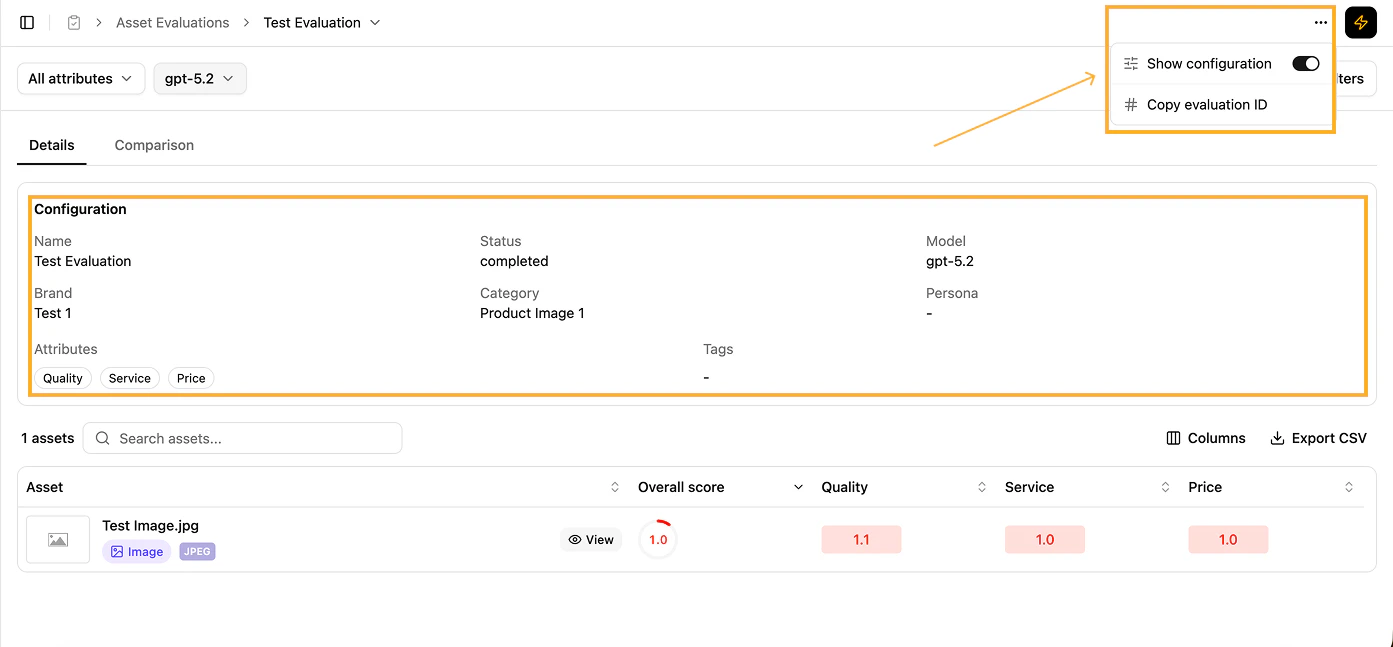
    <Frame caption="Overall scoring">
      <img src="https://mintcdn.com/jellyfish/oiuNBuQ2NqPF1etD/images/platform/evaluations/Config-2eac15dc.png?fit=max&auto=format&n=oiuNBuQ2NqPF1etD&q=85&s=16b743164db96efdcd6733140c49feb3" alt="Overall scoring" width="1393" height="647" data-path="images/platform/evaluations/Config-2eac15dc.png" />
    </Frame>
  </Step>

  <Step title="Drill down by attribute">
    Use the filters on top to focus on specific attributes and view scores across assets.
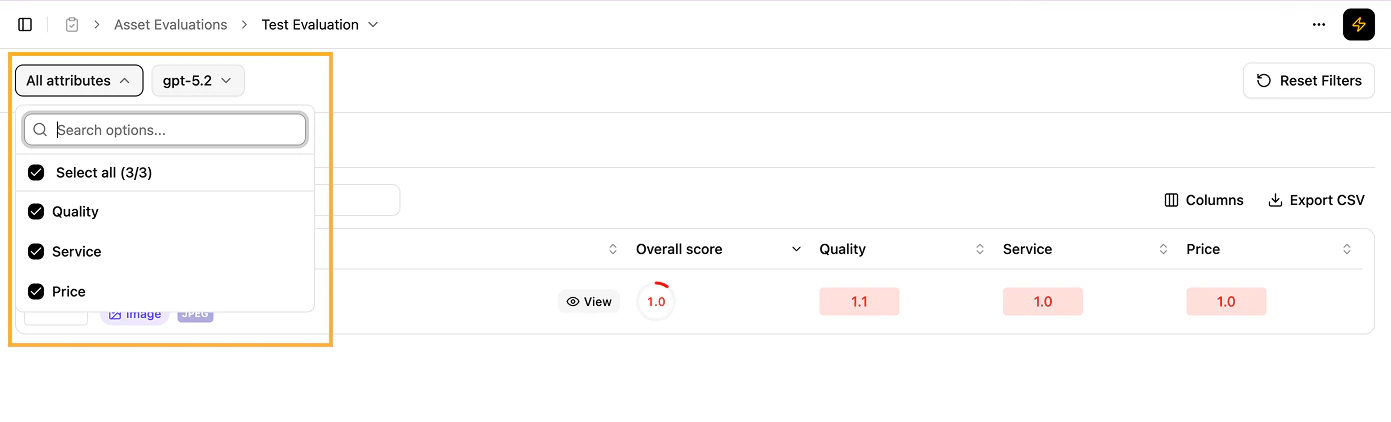
    <Frame caption="Attribute drill-down">
      <img src="https://mintcdn.com/jellyfish/MmUm2_YE5Jn6SqTt/images/platform/evaluations/Attribute-drill-down-b3507fc1.png?fit=max&auto=format&n=MmUm2_YE5Jn6SqTt&q=85&s=29bad80f7e660425547dadae66f57aed" alt="Attribute drill-down" width="1391" height="422" data-path="images/platform/evaluations/Attribute-drill-down-b3507fc1.png" />
    </Frame>
  </Step>

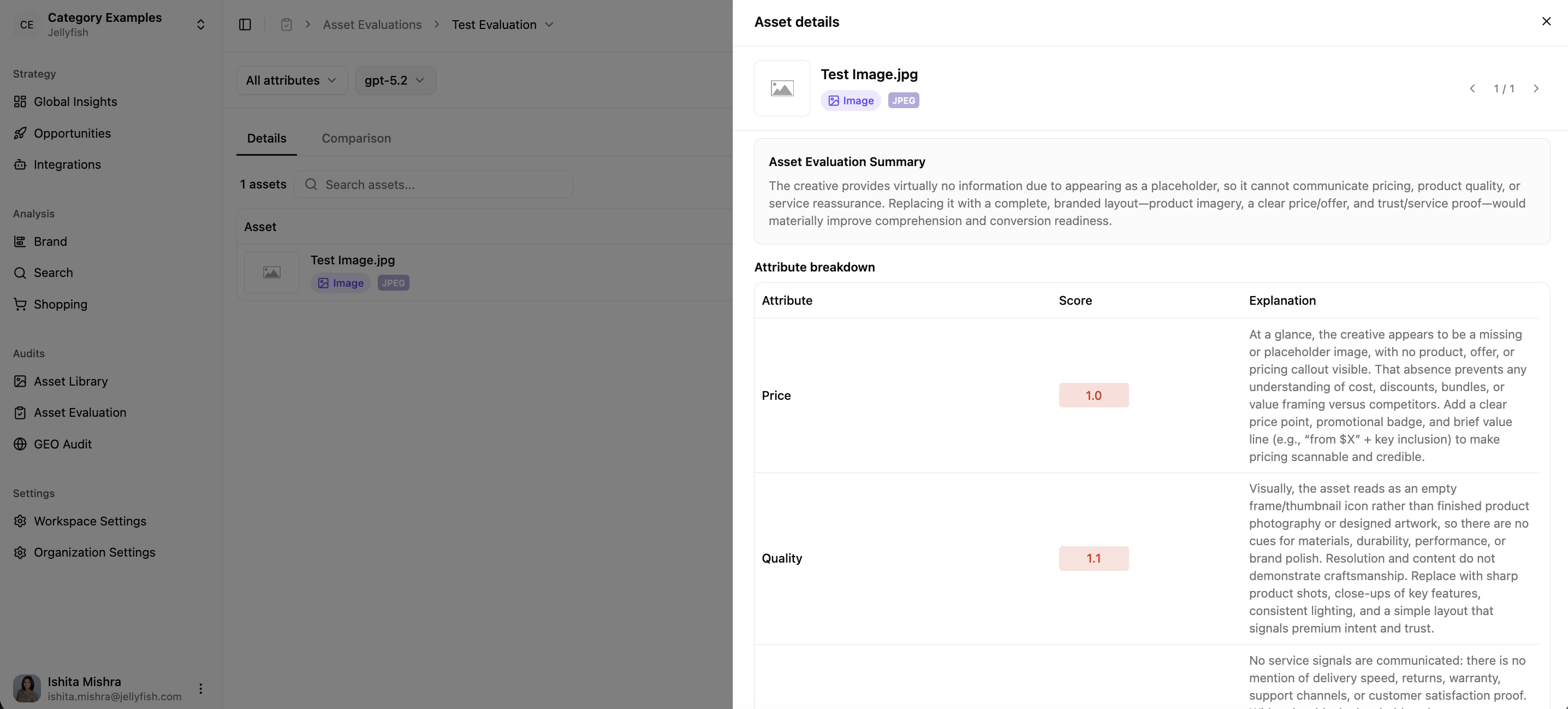
  <Step title="Inspect asset-specific insights">
    Click any asset to see:

    * **Overall Score** — a holistic performance rating.
    * **Attribute Breakdown** — score and detailed explanation per attribute.
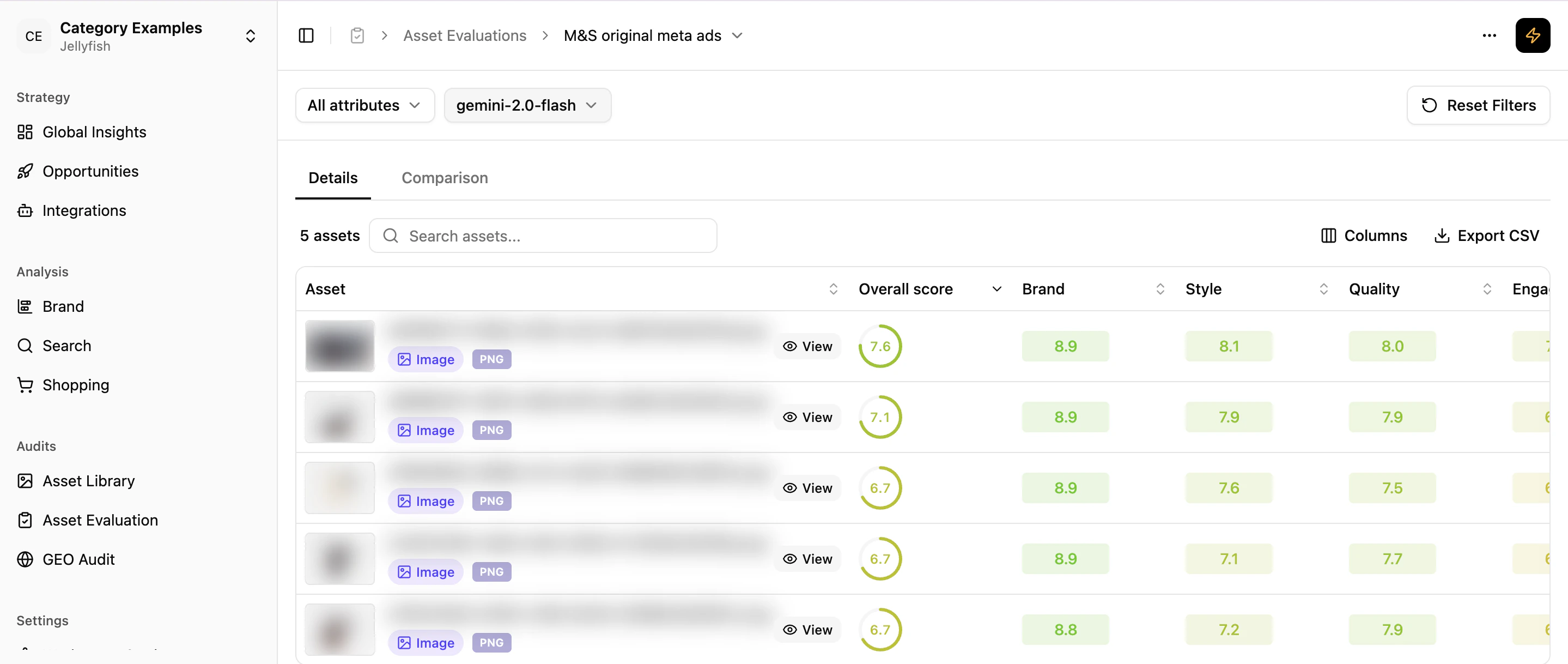
    <Frame caption="Asset evaluation scores">
      <img src="https://mintcdn.com/jellyfish/MmUm2_YE5Jn6SqTt/images/platform/evaluations/12_1-Asset-Evaluation-Scores-b63f716a.png?fit=max&auto=format&n=MmUm2_YE5Jn6SqTt&q=85&s=c9c5503783479917bb190ec3c21df0f3" alt="Asset scores" width="2878" height="1218" data-path="images/platform/evaluations/12_1-Asset-Evaluation-Scores-b63f716a.png" />
    </Frame>

    <Frame caption="Asset details">
      <img src="https://mintcdn.com/jellyfish/MmUm2_YE5Jn6SqTt/images/platform/evaluations/12_2-Asset-Details-376938f1.png?fit=max&auto=format&n=MmUm2_YE5Jn6SqTt&q=85&s=17c53e7fcdf4c6ed72ed15da42edad6f" alt="Asset details" width="2872" height="1298" data-path="images/platform/evaluations/12_2-Asset-Details-376938f1.png" />
    </Frame>
  </Step>

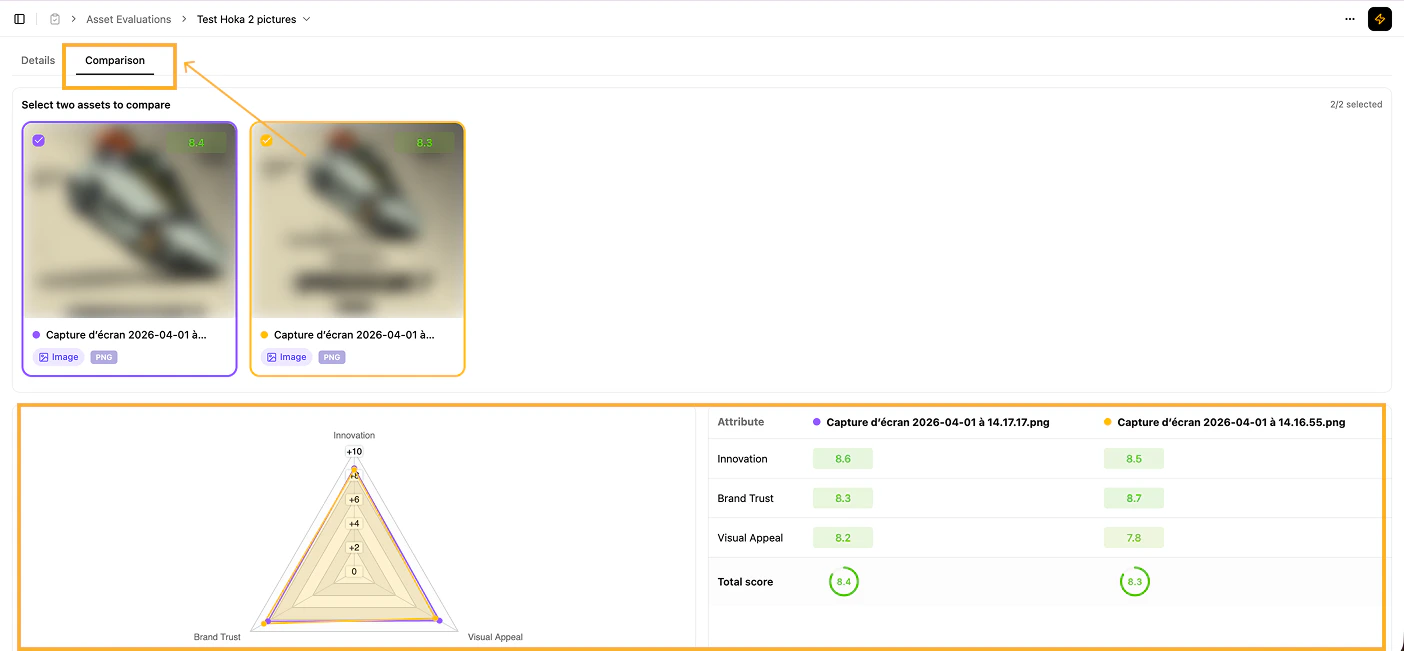
  <Step title="Compare assets side by side">
    Select any two assets to compare their performance on the key attributes.
    <Frame caption="Asset comparison">
      <img src="https://mintcdn.com/jellyfish/oiuNBuQ2NqPF1etD/images/platform/evaluations/Comparison-4d0da931.png?fit=max&auto=format&n=oiuNBuQ2NqPF1etD&q=85&s=d776cedb159f9c5fbf62c608a07b9d70" alt="Asset comparison" width="1404" height="651" data-path="images/platform/evaluations/Comparison-4d0da931.png" />
    </Frame>
  </Step>
</Steps>

## What's next

<CardGroup cols={2}>
  <Card title="Pencil Scoring" icon="pen" href="/platform/evaluations/share-of-model-scoring-in-pencil-pro">
    Score creatives directly inside Pencil Pro.
  </Card>

  <Card title="GEO Audit" icon="magnifying-glass-chart" href="/platform/evaluations/geo-audit">
    Audit your website for AI readability.
  </Card>
</CardGroup>