> ## Documentation Index
> Fetch the complete documentation index at: https://docs.shareofmodel.ai/llms.txt
> Use this file to discover all available pages before exploring further.
# Advertisers
> Understand which advertiser domains capture paid visibility, how broadly they appear across your tracked prompt territory, and which brands they promote.
As advertising becomes part of conversational AI experiences, understanding paid visibility requires looking beyond individual ads to identify **who is occupying that advertising space**.
The Advertisers view provides the competitive layer of your Ads analysis. It helps you compare **which advertiser domains are surfaced, how much paid visibility they capture, how broadly they appear across ad-supported prompts, and which brands they promote.**
This is particularly important because the **advertiser and the promoted brand are not necessarily the same entity**. Advertisers are identified from the domain retrieved from the ad, while Brand Mentions reveal the brands being promoted through those placements.
## What this view helps you analyse
The Advertisers view helps you understand **who captures paid visibility across your AI advertising landscape**.
For each advertiser domain, you can analyse:
* **Share of Ad Voice**, to understand its share of total paid visibility;
* **Ad Presence Rate**, to understand how broadly it appears across ad-supported prompts;
* **Total Ads**, to measure its advertising volume;
* **Total Results**, to understand across how many results that activity occurs;
* **Brand Mentions**, to identify the brands promoted through that advertiser;
* **Engine**, to understand where the advertiser is active.
Together, these signals help distinguish between advertisers with **broad presence across the prompt territory** and those generating **more concentrated advertising activity**.
### Compare who captures paid visibility
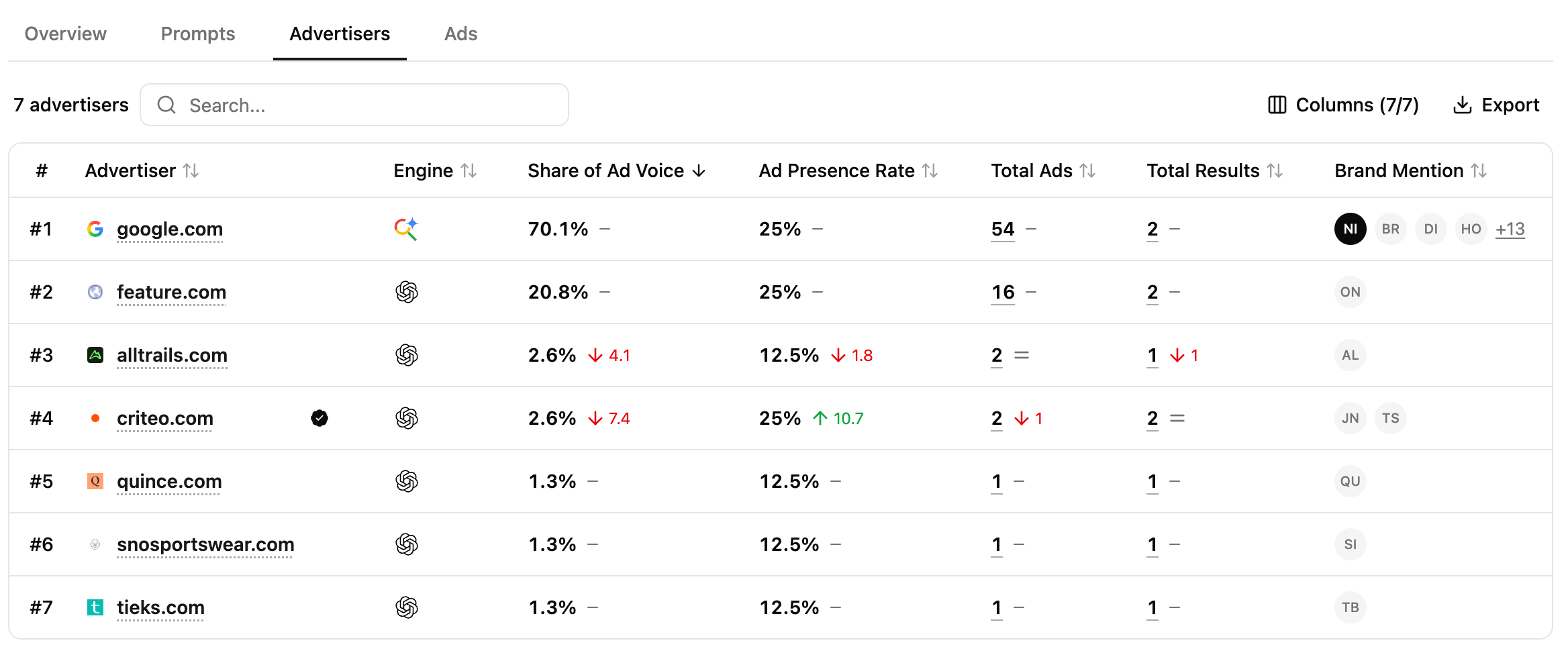 Use **Share of Ad Voice** and **Ad Presence Rate** together to compare advertiser visibility from two complementary perspectives.
**Share of Ad Voice** shows how much of the observed paid visibility an advertiser captures, while **Ad Presence Rate** shows how broadly that advertiser appears across the prompts where ads are present.
This helps reveal different competitive strategies: an advertiser may appear across many ad-supported prompts without dominating total ad visibility, while another may generate significant visibility across a more concentrated set of prompts.
### Connect advertisers to the brands they promote
**Brand Mentions** help you understand which brands are being promoted through each advertiser domain.
This distinction matters because an advertiser is identified from the **domain retrieved from the ad**, rather than from the brand displayed in the creative.
For example, a Google Shopping placement may be attributed to `google.com` when Google is the domain retrieved from the ad, while the Brand Mentions identify the brands actually promoted within those placements.
Use both dimensions together to understand **who provides the advertising placement and which brands ultimately gain exposure from it.**
### Investigate an advertiser's paid footprint
Use **Share of Ad Voice** and **Ad Presence Rate** together to compare advertiser visibility from two complementary perspectives.
**Share of Ad Voice** shows how much of the observed paid visibility an advertiser captures, while **Ad Presence Rate** shows how broadly that advertiser appears across the prompts where ads are present.
This helps reveal different competitive strategies: an advertiser may appear across many ad-supported prompts without dominating total ad visibility, while another may generate significant visibility across a more concentrated set of prompts.
### Connect advertisers to the brands they promote
**Brand Mentions** help you understand which brands are being promoted through each advertiser domain.
This distinction matters because an advertiser is identified from the **domain retrieved from the ad**, rather than from the brand displayed in the creative.
For example, a Google Shopping placement may be attributed to `google.com` when Google is the domain retrieved from the ad, while the Brand Mentions identify the brands actually promoted within those placements.
Use both dimensions together to understand **who provides the advertising placement and which brands ultimately gain exposure from it.**
### Investigate an advertiser's paid footprint
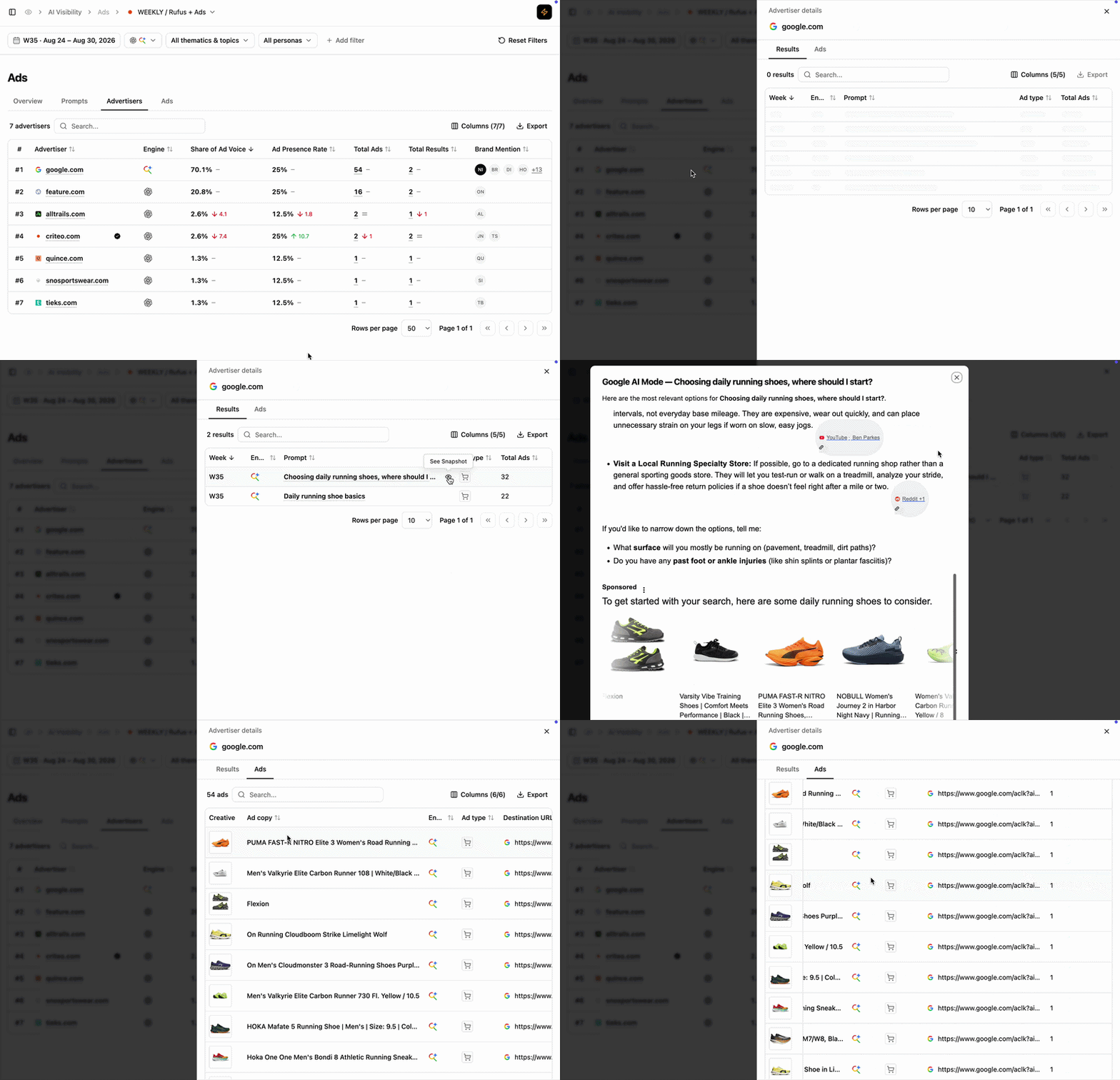 Open **Advertiser Details** to understand what drives an advertiser's visibility.
* **Results** shows the underlying prompts and AI results where the advertiser appears, alongside engine, ad type and advertising volume.
* **Ads** shows the individual creatives, ad copy, ad types and destination URLs associated with that advertiser.
This lets you move from **advertiser-level performance → where they appear → what they are promoting and how they present it.**
## Reading cues
These are signals to read, not rules.
The advertiser combines a large share of overall paid visibility with broad coverage across ad-supported prompts. Explore its Results to understand which user needs drive that footprint.
The advertiser appears across many of the prompts where advertising exists but captures a smaller share of total paid visibility. This can indicate broad presence without the same level of advertising volume.
Advertising volume is concentrated within a smaller number of results rather than distributed broadly across the tracked territory.
The advertiser domain is providing paid visibility to multiple brands. Explore its Ads to understand which brands, products and creatives contribute to that activity.
## How to use this view effectively
Start with **Share of Ad Voice and Ad Presence Rate** to compare the scale and breadth of advertiser visibility.
Then use **Brand Mentions, Total Ads and Total Results** to understand what drives that presence.
Open **Advertiser Details** to investigate the prompts, creatives and destinations behind an advertiser's paid footprint.
## Extra features
* **Filters** — refine the data displayed.
* **Add/Hide columns** — adapt the table to your workflow.
* **Export** — extract filtered tables to CSV or Excel.
* **Search** — find a brand or product via the search bar.
* **Sort** — order by any column.
## What's next
Analyse the creatives, messaging and destinations surfaced to users.
Understand how total paid visibility is distributed between advertisers.
Open **Advertiser Details** to understand what drives an advertiser's visibility.
* **Results** shows the underlying prompts and AI results where the advertiser appears, alongside engine, ad type and advertising volume.
* **Ads** shows the individual creatives, ad copy, ad types and destination URLs associated with that advertiser.
This lets you move from **advertiser-level performance → where they appear → what they are promoting and how they present it.**
## Reading cues
These are signals to read, not rules.
The advertiser combines a large share of overall paid visibility with broad coverage across ad-supported prompts. Explore its Results to understand which user needs drive that footprint.
The advertiser appears across many of the prompts where advertising exists but captures a smaller share of total paid visibility. This can indicate broad presence without the same level of advertising volume.
Advertising volume is concentrated within a smaller number of results rather than distributed broadly across the tracked territory.
The advertiser domain is providing paid visibility to multiple brands. Explore its Ads to understand which brands, products and creatives contribute to that activity.
## How to use this view effectively
Start with **Share of Ad Voice and Ad Presence Rate** to compare the scale and breadth of advertiser visibility.
Then use **Brand Mentions, Total Ads and Total Results** to understand what drives that presence.
Open **Advertiser Details** to investigate the prompts, creatives and destinations behind an advertiser's paid footprint.
## Extra features
* **Filters** — refine the data displayed.
* **Add/Hide columns** — adapt the table to your workflow.
* **Export** — extract filtered tables to CSV or Excel.
* **Search** — find a brand or product via the search bar.
* **Sort** — order by any column.
## What's next
Analyse the creatives, messaging and destinations surfaced to users.
Understand how total paid visibility is distributed between advertisers.