> ## Documentation Index
> Fetch the complete documentation index at: https://docs.shareofmodel.ai/llms.txt
> Use this file to discover all available pages before exploring further.
# More Options
> Importing, editing, duplicating, archiving, and deleting personas.
Beyond creating a persona from scratch, the Library supports a handful of other ways to manage your personas. This page covers all of them except [Chat with a Persona](/concepts/chat-with-a-persona), which has its own page.
Most of these actions are available from the **"..."** menu on a persona's card in the Library list, or from the equivalent menu on its detail page.
## Import personas
Rather than creating personas one at a time, you can bulk-import them from a CSV. From the Library, open **Import CSV**:
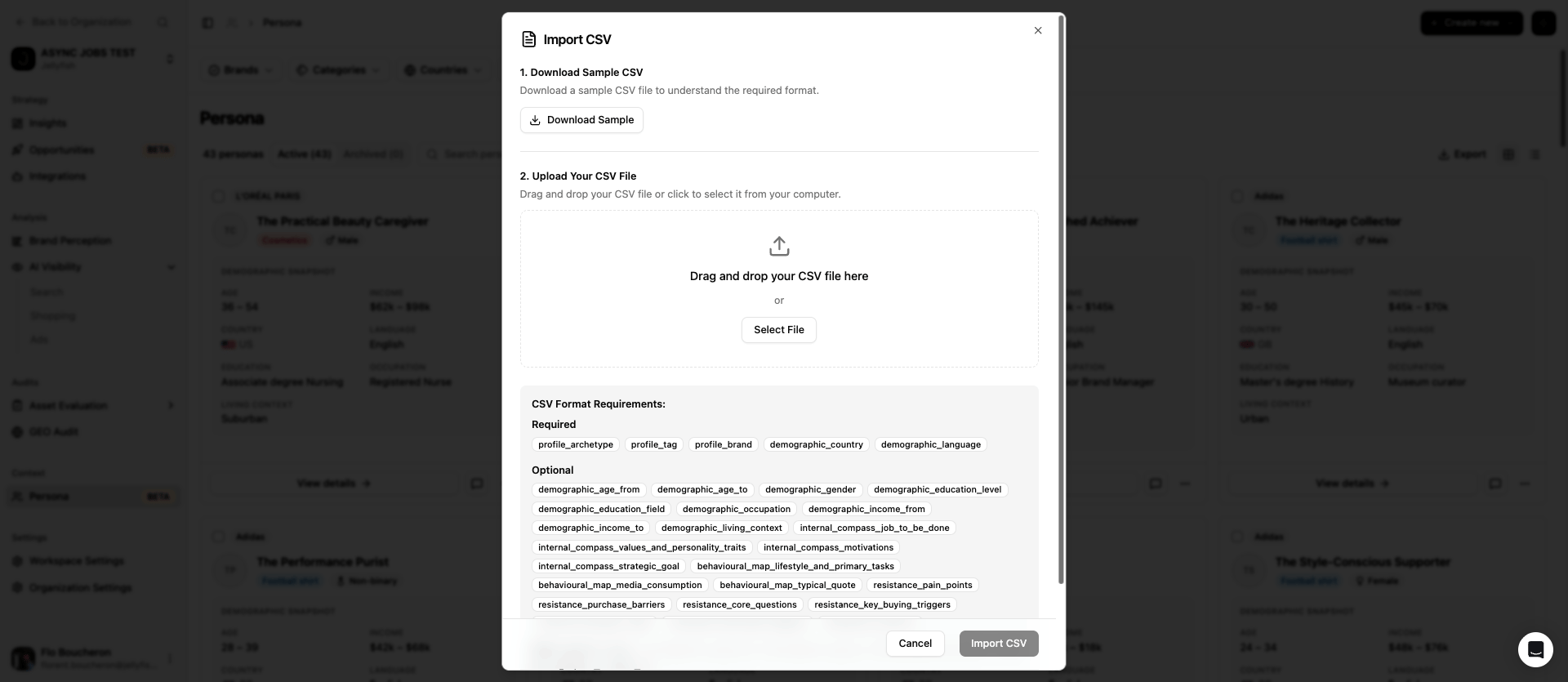 Use **Download Sample** to get a CSV with the expected columns already in place — the fastest way to see the exact format the importer expects.
Here's the same sample, for reference — a single row with the required columns filled in and the rest left blank:
```csv sample-personas.csv theme={null}
profile_archetype,profile_tag,profile_brand,demographic_age_from,demographic_age_to,demographic_gender,demographic_country,demographic_language,demographic_education_level,demographic_education_field,demographic_occupation,demographic_income_from,demographic_income_to,demographic_living_context,internal_compass_job_to_be_done,internal_compass_values_and_personality_traits,internal_compass_motivations,internal_compass_strategic_goal,behavioural_map_lifestyle_and_primary_tasks,behavioural_map_media_consumption,behavioural_map_typical_quote,resistance_pain_points,resistance_purchase_barriers,resistance_core_questions,resistance_key_buying_triggers,connection_product_need,connection_why_loves_category,connection_summary
The Pragmatic Planner,Personal Finance,Acme Corp,30,45,Female,GB,en,Bachelor's degree,Business,Operations Manager,40000,80000,"Urban, lives with partner",,,,,,,,,,,,,,
```
Each row is one persona. Some columns are required, the rest are optional and can be left blank.
| | Fields |
| ------------ | ------------------------------------------------------------------------------------------------------------------------------------------------------------------------------------------------------------------------------------------------------------------------------------------------------------------------------------------------------------------------------------------------------------------------------------------------------------------------------------------------------------------------------------------------------------------------------------------------------------------ |
| **Required** | `profile_archetype`, `profile_tag`, `profile_brand`, `demographic_country`, `demographic_language` |
| **Optional** | `demographic_age_from`, `demographic_age_to`, `demographic_gender`, `demographic_education_level`, `demographic_education_field`, `demographic_occupation`, `demographic_income_from`, `demographic_income_to`, `demographic_living_context`, `internal_compass_job_to_be_done`, `internal_compass_values_and_personality_traits`, `internal_compass_strategic_goal`, `behavioural_map_lifestyle_and_primary_tasks`, `behavioural_map_typical_quote`, `behavioural_map_media_consumption`, `resistance_pain_points`, `resistance_purchase_barriers`, `resistance_core_questions`, `resistance_key_buying_triggers` |
Drag and drop the file onto the upload area, or use **Select File** to browse for it, then confirm the import.
Importing is a fast way to bring in personas you've already researched and documented elsewhere. Fields left blank in the CSV are simply left empty on the resulting persona — the same as any manually created one.
## Edit personas
Select **Edit persona** to open the Edit Persona panel and update any field — archetype, brand, category, demographics, or the persona's avatar (upload an image, or choose one from the stock avatar library, grouped by age range).
Every saved edit creates a new version. You can see the full history on a persona's **Evolution** tab: one row per saved edit, oldest first, showing when it happened, who or what made the change (including AI enrichment), which field blocks were touched, and how many analyses or audits used that version. Use **View** on any past row to open it.
The Evolution tab is where you go to check what changed on a persona over time, or to look back at an earlier version — there's no way to revert to a previous version in place, but the history is always there to consult.
## Duplicate a persona
Select **Duplicate persona** to create a copy of an existing persona. This is the fastest way to reuse a persona you've already refined — for example, adapting the same archetype for another country, another brand, or another category — without rebuilding its profile from scratch.
## Archive a persona
Select **Archive persona** to remove it from the Library's main **Active** list without deleting it. Archived personas move to the **Archived** tab, which keeps its own count alongside Active — useful for retiring personas you're not using right now but may want to bring back later.
## Delete a persona
Select **Delete persona** to permanently remove it.
A persona currently in use by an analysis, a search project, or an asset evaluation can't be deleted. Archive it instead if you just want it out of your main list.
## What's next
How personas are structured, created, and kept up to date.
Have a live, in-character conversation with any persona in your Library.
Use **Download Sample** to get a CSV with the expected columns already in place — the fastest way to see the exact format the importer expects.
Here's the same sample, for reference — a single row with the required columns filled in and the rest left blank:
```csv sample-personas.csv theme={null}
profile_archetype,profile_tag,profile_brand,demographic_age_from,demographic_age_to,demographic_gender,demographic_country,demographic_language,demographic_education_level,demographic_education_field,demographic_occupation,demographic_income_from,demographic_income_to,demographic_living_context,internal_compass_job_to_be_done,internal_compass_values_and_personality_traits,internal_compass_motivations,internal_compass_strategic_goal,behavioural_map_lifestyle_and_primary_tasks,behavioural_map_media_consumption,behavioural_map_typical_quote,resistance_pain_points,resistance_purchase_barriers,resistance_core_questions,resistance_key_buying_triggers,connection_product_need,connection_why_loves_category,connection_summary
The Pragmatic Planner,Personal Finance,Acme Corp,30,45,Female,GB,en,Bachelor's degree,Business,Operations Manager,40000,80000,"Urban, lives with partner",,,,,,,,,,,,,,
```
Each row is one persona. Some columns are required, the rest are optional and can be left blank.
| | Fields |
| ------------ | ------------------------------------------------------------------------------------------------------------------------------------------------------------------------------------------------------------------------------------------------------------------------------------------------------------------------------------------------------------------------------------------------------------------------------------------------------------------------------------------------------------------------------------------------------------------------------------------------------------------ |
| **Required** | `profile_archetype`, `profile_tag`, `profile_brand`, `demographic_country`, `demographic_language` |
| **Optional** | `demographic_age_from`, `demographic_age_to`, `demographic_gender`, `demographic_education_level`, `demographic_education_field`, `demographic_occupation`, `demographic_income_from`, `demographic_income_to`, `demographic_living_context`, `internal_compass_job_to_be_done`, `internal_compass_values_and_personality_traits`, `internal_compass_strategic_goal`, `behavioural_map_lifestyle_and_primary_tasks`, `behavioural_map_typical_quote`, `behavioural_map_media_consumption`, `resistance_pain_points`, `resistance_purchase_barriers`, `resistance_core_questions`, `resistance_key_buying_triggers` |
Drag and drop the file onto the upload area, or use **Select File** to browse for it, then confirm the import.
Importing is a fast way to bring in personas you've already researched and documented elsewhere. Fields left blank in the CSV are simply left empty on the resulting persona — the same as any manually created one.
## Edit personas
Select **Edit persona** to open the Edit Persona panel and update any field — archetype, brand, category, demographics, or the persona's avatar (upload an image, or choose one from the stock avatar library, grouped by age range).
Every saved edit creates a new version. You can see the full history on a persona's **Evolution** tab: one row per saved edit, oldest first, showing when it happened, who or what made the change (including AI enrichment), which field blocks were touched, and how many analyses or audits used that version. Use **View** on any past row to open it.
The Evolution tab is where you go to check what changed on a persona over time, or to look back at an earlier version — there's no way to revert to a previous version in place, but the history is always there to consult.
## Duplicate a persona
Select **Duplicate persona** to create a copy of an existing persona. This is the fastest way to reuse a persona you've already refined — for example, adapting the same archetype for another country, another brand, or another category — without rebuilding its profile from scratch.
## Archive a persona
Select **Archive persona** to remove it from the Library's main **Active** list without deleting it. Archived personas move to the **Archived** tab, which keeps its own count alongside Active — useful for retiring personas you're not using right now but may want to bring back later.
## Delete a persona
Select **Delete persona** to permanently remove it.
A persona currently in use by an analysis, a search project, or an asset evaluation can't be deleted. Archive it instead if you just want it out of your main list.
## What's next
How personas are structured, created, and kept up to date.
Have a live, in-character conversation with any persona in your Library.